
Learning Engine API
A Learning Engine Extension integrates a machine learning or neural network framework with WealthLab's Deep Learning extension. A Learning Engine produces and trains a Model using configurable Inputs and Outputs. Inputs and Outputs are represented by WealthLab Indicators. Outputs typically represent future values, such as percentage return several bars ahead. Training occurs over a number of cycles called Epochs. During training, the Learning Engine evaluates performance using both in-sample and out-of-sample data and reports the resulting error or loss values back to Deep Learning.
Build Environment
You can create a Learning Engine in a .NET development tool such as Visual Studio 2026.
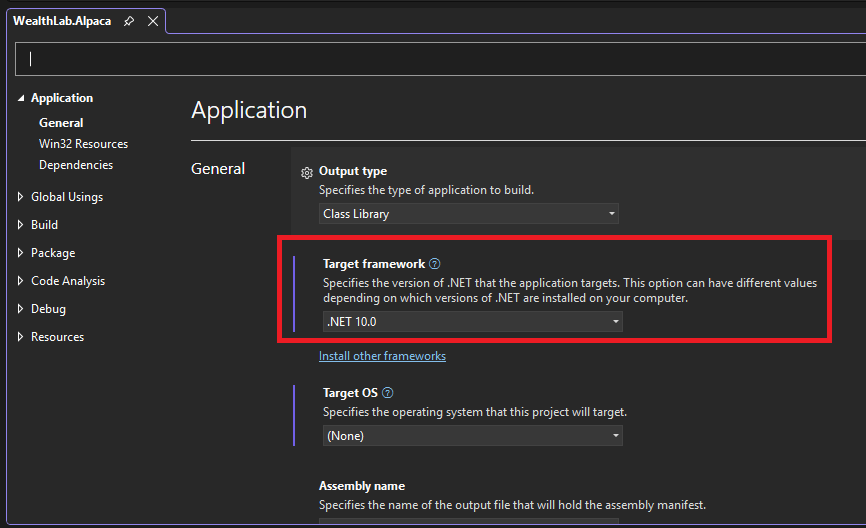
Create a class library project that targets .NET10, then reference the WealthLab.DeepLearning library DLL that you'll find in the WL9 installation folder.
Your Learning Engine will be a class in this library that descends from LearningEngineBase, which is defined in the WealthLab.DeepLearning library, in the WealthLab.DeepLearning namespace. After you implement and build your library, simply copy the resulting assembly DLL into the WL9 installation folder. The next time WL9 starts up, it will discover your Learning Engine, making it available in appropriate locations of the WL9 user interface.
Accessing the Host (WL9) Environment
The IHost interface provides access to the current WealthLab environment. Extensions can use it to retrieve application-level information and services, such as the location of the user's WealthLab data folder or the DataSets defined by the user.
You can access the current IHost instance from anywhere in your extension through the WLHost singleton and its Instance property. For example, the following code retrieves the path to the user's WealthLab data folder:
string folder = WLHost.Instance.DataFolder;
Use WLHost.Instance whenever your extension needs access to functionality exposed by the IHost interface.
Descriptive Properties
Override the following properties to describe your Learning Engine.
Name
public abstract string Name
Return the descriptive name of your Learning Engine. WealthLab uses this name throughout the Deep Learning extension.
Description
public virtual string Description
Return a brief description of the Learning Engine. This description is displayed when the user selects or configures the Learning Engine.
URL
public virtual string URL
Optionally return a URL containing additional information about the machine learning framework or library used by your Learning Engine.
GlyphResource
public virtual string GlyphResource
Return the resource name of an embedded image used as the Learning Engine's icon. For example:
public override string GlyphResource =>
    "WealthLab.DeepLearning.Glyphs.Encog.png";
The image should be stored as an embedded resource in your extension assembly.
DisableGlyphReverse
public virtual bool DisableGlyphReverse
WealthLab can automatically reverse glyph images when displaying them in a dark theme. Override this property and return true if the glyph should be displayed unchanged.
Learning Engine Parameters
Because LearningEngineBase derives from Configurable, it supports the standard WealthLab Parameter configuration framework.
public ParameterList Parameters
public virtual void GenerateParameters()
Override GenerateParameters to add Parameters that configure your Learning Engine. These Parameters are configurable separately for each Model and appear on the Deep Learning Parameters page. For example, a Learning Engine might expose Parameters controlling:
- Learning rate
- Activation function
- Optimizer
- Batch size
- Dropout
- Other framework-specific settings
Hidden Layers
public virtual ParameterList HiddenLayerParameters => null;
Some Learning Engines support one or more configurable Hidden Layers between the Model's Input and Output Layers. If your Learning Engine supports Hidden Layers, override HiddenLayerParameters and return a ParameterList containing the settings that can be configured for each Hidden Layer. Each Hidden Layer receives its own copy of this ParameterList.
Initialization
Initialize
public virtual void Initialize()
Override this method to perform one-time initialization required by the Learning Engine. For example, you might initialize a third-party framework, load global configuration, or prepare shared resources.
InitializeNewModel
public virtual void InitializeNewModel(Model mdl)
WealthLab calls this method when creating a new Model. The default implementation creates:
- One Input based on RSI(4) with a Depth of 5
- One Output based on ROC(4) with a Look Ahead of 4 bars
- One Hidden Layer if the Learning Engine supports Hidden Layers
Override this method if your Learning Engine should begin with a different default Model architecture. You can create InputOutputNode instances and add them to the Model's InputNodes and OutputNodes collections. For example, the default implementation follows this pattern:
public virtual void InitializeNewModel(Model mdl)
{
    InputOutputNode inputNode =
        new InputOutputNode(true);

    inputNode.Depth = 5;

    mdl.InputNodes.Add(inputNode);

    InputOutputNode outputNode =
        new InputOutputNode(false);

    outputNode.Shift = 4;
    outputNode.Parameters[1].Value = 4;

    mdl.OutputNodes.Add(outputNode);

    if (SupportsHiddenLayers)
    {
        ParameterList hiddenLayer =
            HiddenLayerParameters.Clone();

        mdl.HiddenLayers.Add(hiddenLayer);
    }
}
Use Clone when adding Hidden Layer Parameters so that each layer receives its own independent Parameter values.
Data Normalization
RequiresNormalization
public virtual bool RequiresNormalization => true;
Most machine learning frameworks require input data to be normalized before training. The default value is true. Override this property and return false if your Learning Engine does not require normalization. You can also make the result conditional on the Learning Engine's current Parameters. Deep Learning provides built-in normalization independently for Inputs and Outputs.
Standard Deviation Normalization
public virtual bool UseStdDevNormInput => false;
public virtual bool UseStdDevNormOutput => false;
Override these properties and return true when the Learning Engine should use standard deviation unit variance normalization. This normalization transforms the data so that it has a standard deviation of 1.
Fixed-Range Normalization
public virtual double InputNormMin => -1.0;
public virtual double InputNormMax => 1.0;
public double InputNormRange =>
    InputNormMax - InputNormMin;
public virtual double OutputNormMin => -1.0;
public virtual double OutputNormMax => 1.0;
public virtual double OutputNormRange =>
    OutputNormMax - OutputNormMin;
When standard deviation normalization is not enabled, Deep Learning uses fixed-range normalization. The default range is:
-1.0 to 1.0
Override the minimum and maximum values if your Learning Engine requires a different range. Inputs and Outputs can use different normalization ranges.
Custom Normalization
public virtual void Normalize(
    List<double> vals,
    InputOutputNode node)

public virtual void DeNormalize(
    List<double> vals,
    InputOutputNode node)
Override these methods if the built-in normalization methods are not appropriate for your Learning Engine. Normalize receives the original values in vals. Replace the values in the List with their normalized equivalents. DeNormalize performs the reverse transformation. The associated InputOutputNode is supplied in node, allowing your normalization logic to depend on the particular Input or Output being processed.
Creating the Network
public abstract void CreateNetwork(Model model)
WealthLab calls CreateNetwork when the Learning Engine needs to create the internal objects required to train or use the supplied Model. For a neural network Learning Engine, this is typically where you create the native network and configure its layers, nodes, activation functions, and other architecture-specific settings.
ReadyForPrediction
public abstract bool ReadyForPrediction { get; }
Return true when the Learning Engine has created or loaded the internal state required to generate predictions. This will typically become true after either:
- CreateNetwork has initialized a new network.
- LoadState has restored a previously trained network.
Setting Up Training
public abstract void SetupTraining(Model model)
WealthLab calls SetupTraining when a new training session is about to begin. Use this method to convert the data prepared by Deep Learning into the native data structures required by your machine learning framework. The Model exposes the normalized training and evaluation data through:
- PreparedInSampleInputs
- PreparedInSampleOutputs
- PreparedOutOfSampleInputs
- PreparedOutOfSampleOutputs
Each property is a:
List<List<double>>
The outer List corresponds to the Model's individual Inputs or Outputs. The inner List contains the values for that Input or Output. For example, if a Model has two Inputs and 1,000 in-sample observations, PreparedInSampleInputs contains two inner Lists, each containing 1,000 values. All values supplied through these collections have already been normalized.
Training an Epoch
public abstract (double, double) TrainEpoch(
    Model model)
WealthLab calls TrainEpoch once for each Epoch of training. Your implementation should perform two primary operations. First, train the Model using:
PreparedInSampleInputs
PreparedInSampleOutputs
Calculate an appropriate error, loss, or deviation measure for the in-sample data. Second, evaluate the trained Model against:
PreparedOutOfSampleInputs
PreparedOutOfSampleOutputs
Calculate the corresponding error, loss, or deviation for the out-of-sample data. Return both results as the Tuple:
(inSampleError, outOfSampleError)
For example:
public override (double, double) TrainEpoch(
    Model model)
{
    double trainingError =
        // perform one training epoch

    double validationError =
        // evaluate out-of-sample data

    return (
        trainingError,
        validationError);
}
Deep Learning uses these values to display and monitor Model performance during training.
Finishing Training
public abstract void FinishTraining(Model model)
WealthLab calls FinishTraining after a training session has completed. Override this method to perform any framework-specific cleanup or finalization.
Data Batching
Some machine learning frameworks require large training sets to be divided into batches. If your Learning Engine needs to batch Inputs and Outputs, you can use the BatchedInputsOutputs utility class to assist with preparing the data.
Persisting Model State
Learning Engines must be able to save and restore their trained internal state. For a neural network, this generally means persisting information such as weights and biases.
SaveState
public abstract void SaveState(
    Model mdl,
    string fileName)
Override this method to save the internal trained state associated with mdl to the specified file. If you are integrating a third-party machine learning framework, use its native persistence mechanism when available. For example, the Encog Learning Engine follows this pattern:
public override void SaveState(
    Model model,
    string fileName)
{
    if (_nn == null)
        return;

    lock (_fileLock)
    {
        FileInfo fi =
            new FileInfo(fileName);

        EncogDirectoryPersistence.SaveObject(
            fi,
            _nn);
    }
}
LoadState
public abstract void LoadState(
    Model mdl,
    string fileName)
Override this method to restore a previously saved Model state. After LoadState completes successfully, your Learning Engine should have all internal objects necessary to generate predictions. For example:
public override void LoadState(
    Model model,
    string fileName)
{
    lock (_fileLock)
    {
        if (!File.Exists(fileName))
            return;

        FileInfo fi =
            new FileInfo(fileName);

        _nn =
            EncogDirectoryPersistence.LoadObject(fi)
            as BasicNetwork;
    }
}
Prediction
public abstract List<List<double>> Predict(
    Model mdl,
    List<List<double>> inputs)
Override Predict to generate predicted Outputs for the supplied Model using the supplied Input data. The Input structure follows the same format used by SetupTraining:
List<List<double>>
Each outer List element represents one Model Input, and its inner List contains the observations for that Input. Return the predictions in the same structure:
List<List<double>>
Each outer List element represents one Model Output, and the corresponding inner List contains the predicted values for that Output. For example, a Model with two Outputs should return two Lists of predicted values. Deep Learning handles the surrounding Model workflow, while the Learning Engine is responsible for converting these values into the native representation required by its framework, running the Model, and returning the resulting predictions.