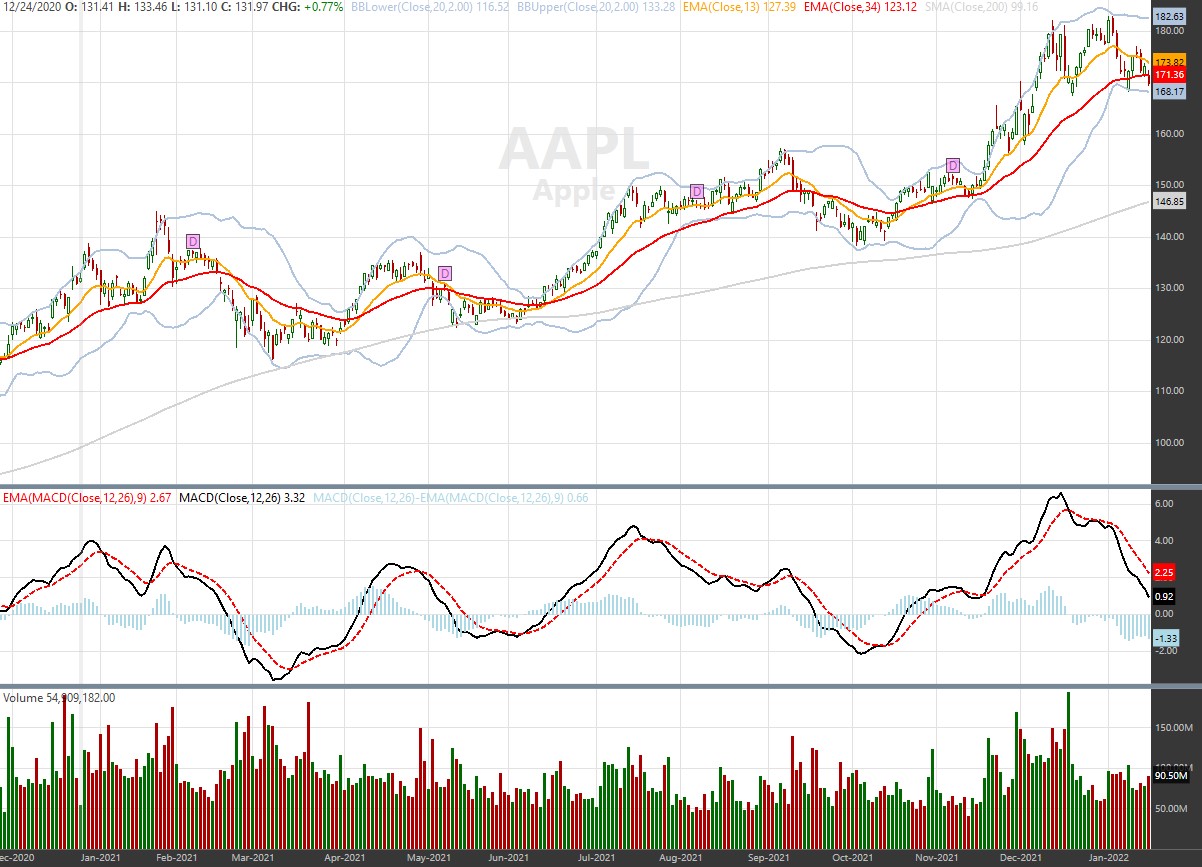
As I'm porting strategies over from WL6 to WL7 I notice plotting series has significant difference in colors. Is there a reason the colors look so different? So many of the WL7 colors seem grayer. For example: SteelLightBlue for the Bollinger Bands and LightBlue for the MACD histogram; or Orange appears brown for the short EMA.
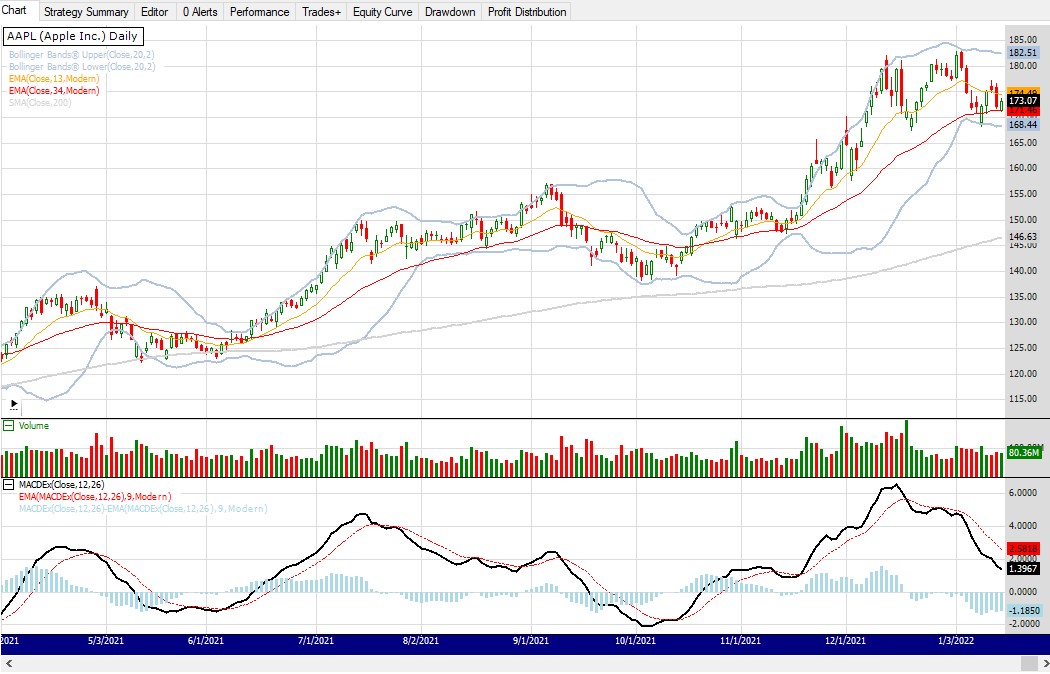
WL6 CODE:
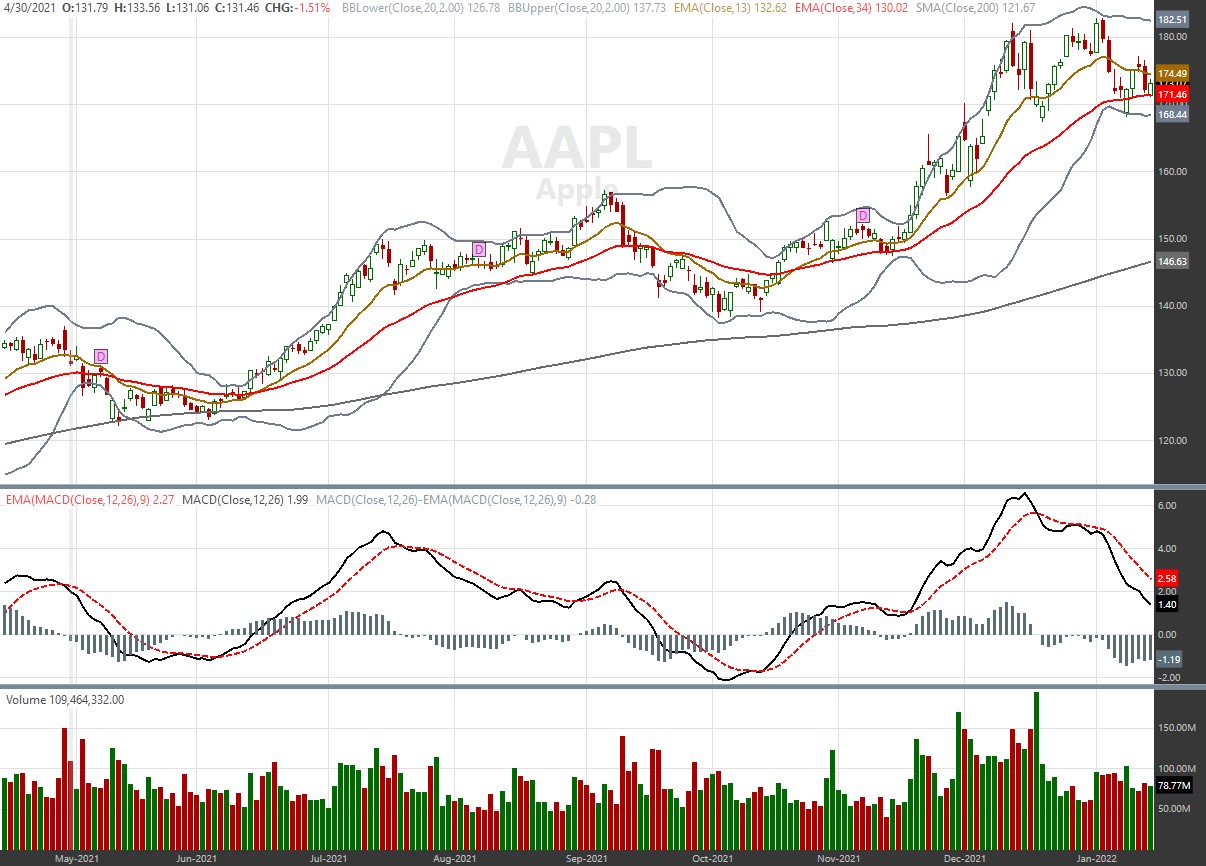
WL7 CODE:
WL6 CODE:
CODE:
using System;
using System.Collections.Generic;
using System.Text;
using System.Drawing;
using WealthLab;
using WealthLab.Indicators;
using Community.Indicators;
using Community.Components;
using TASCIndicators;

namespace WealthLab.Strategies
{
   public class MyStrategy0 : WealthScript
   {
      protected override void Execute()
      {
         DataSeries dsMaShort = EMA.Series(Close, 13, WealthLab.Indicators.EMACalculation.Modern);
         DataSeries dsMaMid = EMA.Series(Close, 34, WealthLab.Indicators.EMACalculation.Modern);
         DataSeries dsMaLong = SMA.Series(Close, 200);

         DataSeries dsBBUpper = BBandUpper.Series(Close, 20, 2.0);
         DataSeries dsBBLower = BBandLower.Series(Close, 20, 2.0);

         PlotSeriesFillBand(PricePane, dsBBUpper, dsBBLower, Color.LightSteelBlue, Color.Transparent, LineStyle.Solid, 2);

         PlotSeries(PricePane, dsMaShort, Color.Orange, WealthLab.LineStyle.Solid, 1);
         PlotSeries(PricePane, dsMaMid, Color.Red, WealthLab.LineStyle.Solid, 1);
         PlotSeries(PricePane, dsMaLong, Color.LightGray, WealthLab.LineStyle.Solid, 2);

         DataSeries dsMacd = MACDEx.Series(Close, 12, 26);
         DataSeries dsMacdSignal = EMA.Series(dsMacd, 9, WealthLab.Indicators.EMACalculation.Modern);
         DataSeries dsMacdHist = dsMacd - dsMacdSignal;

         ChartPane MACDExPane = CreatePane(40, false, true);
         PlotSeries(MACDExPane, dsMacd, Color.Black, LineStyle.Solid, 2);
         PlotSeries(MACDExPane, dsMacdSignal, Color.Red, LineStyle.Dashed, 1);
         PlotSeries(MACDExPane, dsMacdHist, Color.LightBlue, LineStyle.Histogram, 4);

         for(int bar = 20; bar < Bars.Count; bar++)
         {
            if (IsLastPositionActive)
            {
               //code your exit rules here
            }
            else
            {
               //code your entry rules here
            }
         }
      }
   }
}
WL7 CODE:
CODE:
using WealthLab.Backtest;
using System;
using WealthLab.Core;
using WealthLab.Indicators;
using System.Drawing;
using System.Collections.Generic;

namespace WealthScript1
{
    public class MyStrategy : UserStrategyBase
    {
        //create indicators and other objects here, this is executed prior to the main trading loop
        public override void Initialize(BarHistory bars)
        {
         IndicatorBase dsMaShort = EMA.Series(bars.Close, 13);
         IndicatorBase dsMaMid = EMA.Series(bars.Close, 34);
         IndicatorBase dsMaLong = SMA.Series(bars.Close, 200);

         IndicatorBase dsBBUpper = BBUpper.Series(bars.Close, 20, 2.0);
         IndicatorBase dsBBLower = BBLower.Series(bars.Close, 20, 2.0);

         PlotIndicator(dsBBUpper, Color.LightSteelBlue, PlotStyles.Line);
         PlotIndicator(dsBBLower, Color.LightSteelBlue, PlotStyles.Line);

         PlotIndicator(dsMaShort, Color.Orange, PlotStyles.Line);
         PlotIndicator(dsMaMid, Color.Red, PlotStyles.Line);
         PlotIndicator(dsMaLong, Color.LightGray, PlotStyles.Line);

         IndicatorBase dsMacd = MACD.Series(bars.Close, 12, 26);
         IndicatorBase dsMacdSignal = EMA.Series(dsMacd, 9);
         TimeSeries dsMacdHist = dsMacd - dsMacdSignal;

         SetPaneDrawingOptions("MACD", 40);
         PlotIndicator(dsMacd, Color.Black, PlotStyles.Line, false, "MACD");
         PlotIndicator(dsMacdSignal, Color.Red, PlotStyles.DashedLine, false, "MACD");
         PlotTimeSeries(dsMacdHist, dsMacdHist.Description, "MACD", Color.LightBlue, PlotStyles.Histogram);
      }

        //execute the strategy rules here, this is executed once for each bar in the backtest history
        public override void Execute(BarHistory bars, int idx)
        {
            if (!HasOpenPosition(bars, PositionType.Long))
            {
                //code your buy conditions here
            }
            else
            {
                //code your sell conditions here
            }
        }

        //declare private variables below

    }
}
Rename
Sorry, trouble with the images getting mixed up. Code in previous post with (hopefully correct) images here...
WL6 IMAGE:
WL7 IMAGE:
WL6 IMAGE:
WL7 IMAGE:
WL7 will darken the colors if needed so there is better contrast against the light background and things don’t look so faded out.
I don't want the colors to fade out, but they are so different in WL7 that I'll have to spend some extra time trying to find the right color that is closer to WL6. The colors were picked in WL6 so some would stand out while others would be more of a background guide.
Right now a Bollinger band that follows close to the 200 day moving average is going to get confusing when they are two different colors -- LightSteelBlue and LightGray. Those shouldn't look the same.
Right now a Bollinger band that follows close to the 200 day moving average is going to get confusing when they are two different colors -- LightSteelBlue and LightGray. Those shouldn't look the same.
The reason we do this is because with different color themes, and indicators you can drag and drop that have colors across the whole palette, there has to be some way to ensure a color will appear on whatever background color the chart might have. For the dark theme, colors are brightened for example.
You can manipulate the Alpha channel to push a plot back, make it fade out more ...
You can manipulate the Alpha channel to push a plot back, make it fade out more ...
CODE:

        //Initialize
        public override void Initialize(BarHistory bars)
        {
         BBUpper bb = BBUpper.Series(bars.Close, 200, 2.0);
         PlotIndicator(bb, Color.LightSteelBlue);
         SMA sma = SMA.Series(bb, 20);
         PlotIndicator(sma, Color.FromArgb(128, Color.LightGray));
        }
QUOTE:
WL7 will darken the colors if needed so there is better contrast against the light background
I noticed this problem too with all the WL7 PlotWhatever routines. I have to totally avoid lighter colors like Gold or GoldenRod in plots because they come out totally different.
The problem is DrawHeaderText doesn't darken the Color.Orange to brown; whereas, PlotTimeSeries does. So the correspondence is off. What might be better would be to create a Darken(Color.Orange) method, which could be included as the color parameter in the PlotWhatever calls. Then you could have both worlds.
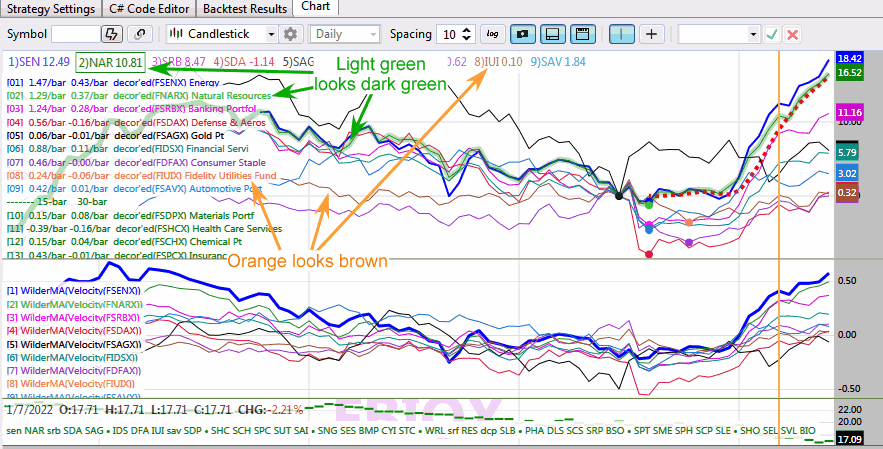
I did have to re-work all my colors from WL6 to make the above plot look better. The original WL6 colors didn't correspond to the DrawHeaderText calls as all. If you use darker colors from the beginning, the correspondence is not so bad.
QUOTE:
... this is because with different color themes, and indicators you can drag and drop that have colors across the whole palette,... ensure a color will appear on whatever background color the chart might have. For the dark theme, colors are brightened for example.
I see. It a good idea, but only for dragAndDrop. For non-dragAndDrop where the user passes a specific color parameter, I would not darken the color by default.
I find this color darkening feature confusing. As you can see from my example, the darkening has caused my indicators to morph into similar colors making it harder to separate them. In superticker's case, they seem to have different colors between indicator and legend.
Let the author of the strategy change their color if they think it is fading out. Having the application change the colors just makes charts confusing. If the darkening feature needs to stay, give the user the ability to disable it if they don't want it.
I have not used drag and drop. Perhaps the solution is to nudge the user to use a color that doesn't fade out by reducing the initial colors to choose from. Provide a 'more' button to expand the color list if the user really wants to use one of the other colors. Based on what superticker has found, the lighter colors are the ones that should be avoided.
I'm sure there were good intentions with this darkening feature, but it seems to confuse charts rather than improve them.
Let the author of the strategy change their color if they think it is fading out. Having the application change the colors just makes charts confusing. If the darkening feature needs to stay, give the user the ability to disable it if they don't want it.
I have not used drag and drop. Perhaps the solution is to nudge the user to use a color that doesn't fade out by reducing the initial colors to choose from. Provide a 'more' button to expand the color list if the user really wants to use one of the other colors. Based on what superticker has found, the lighter colors are the ones that should be avoided.
I'm sure there were good intentions with this darkening feature, but it seems to confuse charts rather than improve them.
Introducing the extra preferences to all users would have a far more confusing effect than leaving things as is. As a rule of thumb we should only add checkboxes if they're essential.
There are different ways to implement this. Here are some thoughts:
* Perference setting (might be more confusing);
* Method or property in UserStrategyBase to enable or disable feature (good for code base strategies only);
* Make it manual rather than automatic.
I don't know the details of why this got implemented. Glitched mentioned color themes and indicator colors were having issues. How often does someone change their color theme?? I'm suggesting this needs to be reworked for everyone because the darkening feature is taking away colors we can use as strategy developers. I can't pick a light color because the application will automatically darken it into something else.
Even drag and drop indicators should allow the user to change the color. That allows the user to pick a color that works for them if it fades out. Better for a user to pick a color than having the application force one on them. I know some friends who are color blind to certain colors so you never want to force a color on someone.
Can we have a manual option to 'Fix Indicator Colors' which runs this feature instead of doing it automatically? Just have it as a menu option. This might be useful if the indicator has faded so bad the user can't find the indicator to change the color. Saving the strategy should save the new color settings.
Just some ideas. I am looking for a solution that works better for me to allow me to use the colors I liked in WL6, but I want something that works for everyone without being confusing. To me the current option of changing the color automatically is very confusing.
* Perference setting (might be more confusing);
* Method or property in UserStrategyBase to enable or disable feature (good for code base strategies only);
* Make it manual rather than automatic.
I don't know the details of why this got implemented. Glitched mentioned color themes and indicator colors were having issues. How often does someone change their color theme?? I'm suggesting this needs to be reworked for everyone because the darkening feature is taking away colors we can use as strategy developers. I can't pick a light color because the application will automatically darken it into something else.
Even drag and drop indicators should allow the user to change the color. That allows the user to pick a color that works for them if it fades out. Better for a user to pick a color than having the application force one on them. I know some friends who are color blind to certain colors so you never want to force a color on someone.
Can we have a manual option to 'Fix Indicator Colors' which runs this feature instead of doing it automatically? Just have it as a menu option. This might be useful if the indicator has faded so bad the user can't find the indicator to change the color. Saving the strategy should save the new color settings.
Just some ideas. I am looking for a solution that works better for me to allow me to use the colors I liked in WL6, but I want something that works for everyone without being confusing. To me the current option of changing the color automatically is very confusing.
Did you try setting the Alpha channel like I described above?
I hadn't, but I did just now and the colors still appear different than WL6 (see below). My code below took the code sample at the beginning and made the modifications you suggested.
I have some code that uses Alpha to create a heat map affect in coloring, so modifying colors automatically by WL7 concerns me that it could affect that as well (even though I have not seen any evidence yet).
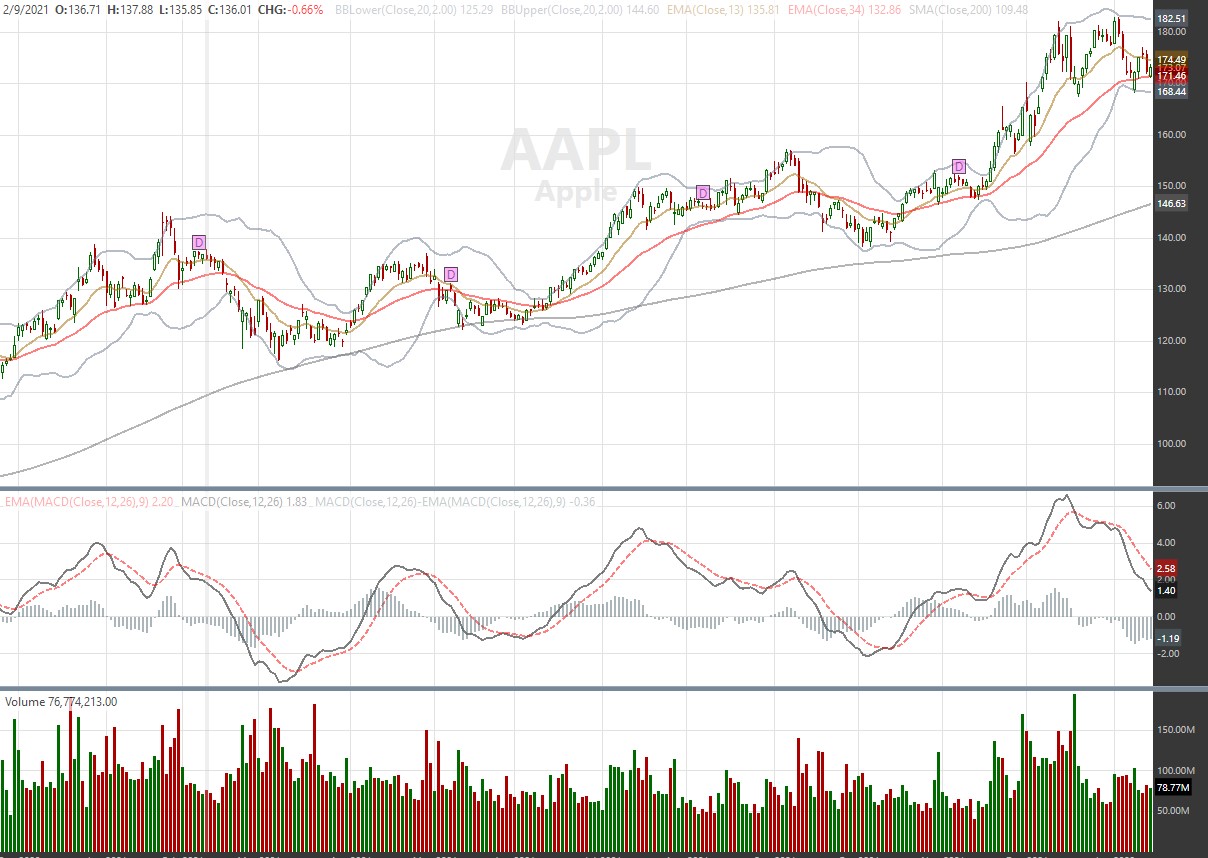
Here's my code...
I have some code that uses Alpha to create a heat map affect in coloring, so modifying colors automatically by WL7 concerns me that it could affect that as well (even though I have not seen any evidence yet).
Here's my code...
CODE:
using WealthLab.Backtest;
using System;
using WealthLab.Core;
using WealthLab.Indicators;
using System.Drawing;
using System.Collections.Generic;

namespace WealthScript1
{
   public class MyStrategy : UserStrategyBase
   {
      //create indicators and other objects here, this is executed prior to the main trading loop
      public override void Initialize(BarHistory bars)
      {
         IndicatorBase dsMaShort = EMA.Series(bars.Close, 13);
         IndicatorBase dsMaMid = EMA.Series(bars.Close, 34);
         IndicatorBase dsMaLong = SMA.Series(bars.Close, 200);

         IndicatorBase dsBBUpper = BBUpper.Series(bars.Close, 20, 2.0);
         IndicatorBase dsBBLower = BBLower.Series(bars.Close, 20, 2.0);

         PlotIndicator(dsBBUpper, Color.FromArgb(128, Color.LightSteelBlue), PlotStyles.Line);
         PlotIndicator(dsBBLower, Color.FromArgb(128, Color.LightSteelBlue), PlotStyles.Line);

         PlotIndicator(dsMaShort, Color.FromArgb(128, Color.Orange), PlotStyles.Line);
         PlotIndicator(dsMaMid, Color.FromArgb(128, Color.Red), PlotStyles.Line);
         PlotIndicator(dsMaLong, Color.FromArgb(128, Color.LightGray), PlotStyles.Line);

         IndicatorBase dsMacd = MACD.Series(bars.Close, 12, 26);
         IndicatorBase dsMacdSignal = EMA.Series(dsMacd, 9);
         TimeSeries dsMacdHist = dsMacd - dsMacdSignal;

         SetPaneDrawingOptions("MACD", 40);
         PlotIndicator(dsMacd, Color.FromArgb(128, Color.Black), PlotStyles.Line, false, "MACD");
         PlotIndicator(dsMacdSignal, Color.FromArgb(128, Color.Red), PlotStyles.DashedLine, false, "MACD");
         PlotTimeSeries(dsMacdHist, dsMacdHist.Description, "MACD", Color.FromArgb(128, Color.LightBlue), PlotStyles.Histogram);
      }

      //execute the strategy rules here, this is executed once for each bar in the backtest history
      public override void Execute(BarHistory bars, int idx)
      {
         if (!HasOpenPosition(bars, PositionType.Long))
         {
            //code your buy conditions here
         }
         else
         {
            //code your sell conditions here
         }
      }

      //declare private variables below

   }
}
OK, let's disable it for indicators plotted in Strategies.
The major downside I see here is for folks sharing strategies. If someone using a light theme shares their strategy with someone using a dark theme, the indicators may not appear clearly. But let's see if this really becomes something more than a theoretical issue.
If they're sharing a strategy, they should try to use similar color schemes. If not, they have the option of going into the code and changing the color of the indicator. I shared plenty of coded strategies over the years in WL6 and I didn't have any issues.
You have the code in this post with images of WL6 (and WL7 B44). You can see if my code in the new build displays colors similar to WL6 before releasing a new build.
You have the code in this post with images of WL6 (and WL7 B44). You can see if my code in the new build displays colors similar to WL6 before releasing a new build.
Don’t worry. We are changing it so whatever color you set will be used 🙂
You can leave the darkening enabled for dragAndDrop on white background. As pointed out, the problem is the DrawHeaderText doesn't match what's plotted by strategy code, which is confusing.
I found if I replaced the lighter colors from the WL6 version of the strategy with darker ones for WL7, that reduces the problem.
I found if I replaced the lighter colors from the WL6 version of the strategy with darker ones for WL7, that reduces the problem.
Thanks! That should be very helpful fix for me.
Much better with Build 45. Thank you! And quick response!
Your Response
Post
Edit Post
Login is required