There are four Visual Studio 2022 background tasks (see yellow rows on screenshot) that do a great deal of I/O and slow my workstation down big time. How do I configure VS to disable these? I don't want them. And I don't want to share anything on their "hub" server. Does this have something to do with rebuilding nuGet packages? How can I tell?
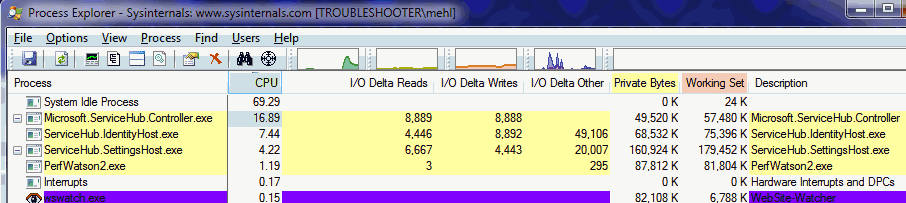
Whatever it's doing, it's not working. It's stuck trying to do pointless I/O.
Whatever it's doing, it's not working. It's stuck trying to do pointless I/O.
Rename
Have you asked this on StackOverflow?
QUOTE:
Have you asked this on StackOverflow?
I'm gathering from your answer this behavior isn't normal. I guess I need to ask StackOverflow then.
I figured out the problem and posted an answer on Stack Overflow. This fix would only apply to those who upgraded from Visual Studio 2019 to VS 2022 while being logged into their Visual Studio (and perhaps GitHub) account.
https://stackoverflow.com/questions/71960309/visual-studio-hub-related-background-tasks-wont-stop
There are other causes for problem, perpetual VS background tasks. One may wish to search Stack Overflow for fixes to these other causes as well.
https://stackoverflow.com/questions/71960309/visual-studio-hub-related-background-tasks-wont-stop
There are other causes for problem, perpetual VS background tasks. One may wish to search Stack Overflow for fixes to these other causes as well.
Your Response
Post
Edit Post
Login is required