After pressing F5 in Visual Studio, WL7 starts. But that’s it. After it starts nothing happens.
I would like to see the code running in WL and be able to debug it from VS. What am I missing?
I looked in Strategies but there is nothing new there.
I followed the steps in https://www.wealth-lab.com/Discussion/New-instruction-for-using-Visual-Studio-to-develop-and-debug-strategies-5494 and in https://www.wealth-lab.com/Support/ExtensionApi/StrategyLibrary
I would like to see the code running in WL and be able to debug it from VS. What am I missing?
I looked in Strategies but there is nothing new there.
I followed the steps in https://www.wealth-lab.com/Discussion/New-instruction-for-using-Visual-Studio-to-develop-and-debug-strategies-5494 and in https://www.wealth-lab.com/Support/ExtensionApi/StrategyLibrary
Rename
How does this coincide with your yesterday question in Post #26 of that topic saying that "Pressing F5 launches WL7 and am able to debug and do some editing"? I'm confused.
When I saw that WL7 finally launched I thought that I'm in. My bad.
In WL6 there was an entry (in the Open strategies dialog window) that I clicked on to debug the VS code. How can I do that in WL7?
In WL6 there was an entry (in the Open strategies dialog window) that I clicked on to debug the VS code. How can I do that in WL7?
On Strategies tab, you will see a gear icon with your compiled strategy library's name if everything is in line with the Strategy Library API guidelines.
Make sure to select NET Core 3.1 as the target framework! We are not working with VS 2022 yet so no idea what could go wrong with this version. It's totally fine in VS2019 though so here's the link if you wish to fall back:
https://visualstudio.microsoft.com/vs/older-downloads/
Make sure to select NET Core 3.1 as the target framework! We are not working with VS 2022 yet so no idea what could go wrong with this version. It's totally fine in VS2019 though so here's the link if you wish to fall back:
https://visualstudio.microsoft.com/vs/older-downloads/
I followed the steps and can see that VS writes to the program folder. Yet don't see a gear icon in the strategies (see attached screen shots).
Using VS2019 with latest .net core 3.1.x. Latest .net core is 3.1.2 (https://dotnet.microsoft.com/en-us/download/dotnet)
Class2.csproj:
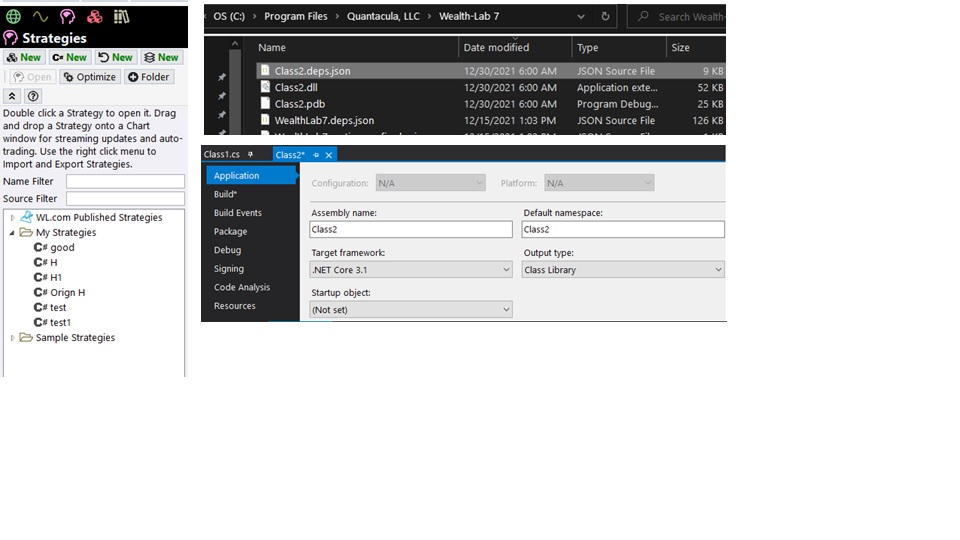
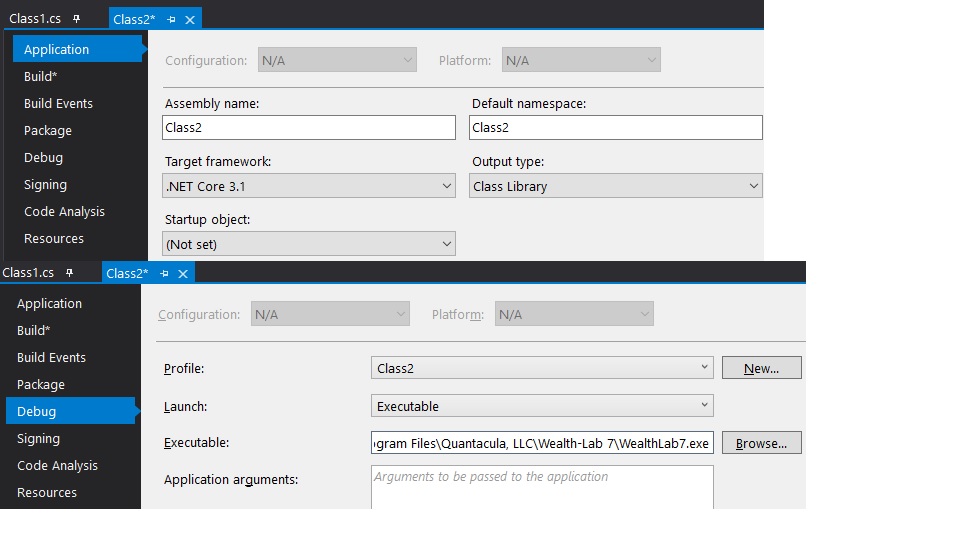
Using VS2019 with latest .net core 3.1.x. Latest .net core is 3.1.2 (https://dotnet.microsoft.com/en-us/download/dotnet)
Class2.csproj:
CODE:
<Project Sdk="Microsoft.NET.Sdk">

  <PropertyGroup>
    <TargetFramework>netcoreapp3.1</TargetFramework>
      <AppendTargetFrameworkToOutputPath>false</AppendTargetFrameworkToOutputPath>
    <AppendRuntimeIdentifierToOutputPath>false</AppendRuntimeIdentifierToOutputPath>
  </PropertyGroup>

//<snippet>
QUOTE:
Yet don't see a gear icon in the strategies
That's the reason. Forget about F5 for now, your strategy library is not recognized by WL7. Follow the instruction and it should work.
I'm at loss...
Everything builds just fine and I can see that a DLL file is created in the program's folder (see screenshot above). Yet there is no gear icon when launching WL7 in the strategies window. What am I missing? Please help
Everything builds just fine and I can see that a DLL file is created in the program's folder (see screenshot above). Yet there is no gear icon when launching WL7 in the strategies window. What am I missing? Please help
You can even build an empty library successfully. Review your code.
Yap, just did that and finally saw the icon. Will review.
Thank you!
Thank you!
Glad to see you're up and running again!
Well, it works with the initial WL7 template. For some reason, the gear icon is not showing with my code even though everything compiles. Will have to troubleshoot why. But at least I know now where to look.
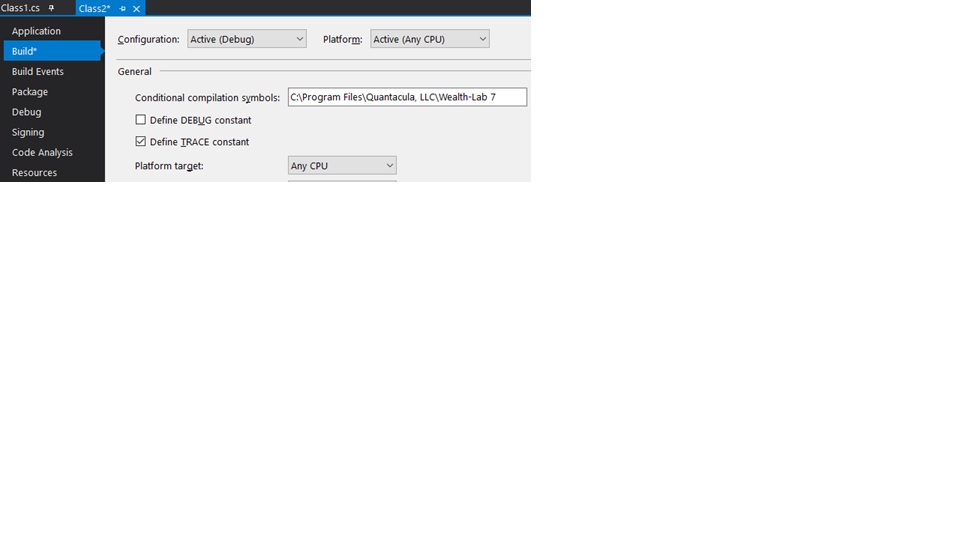
You have a screenshot saying: "Platform target: Any CPU"
That's "probably" not going to work because some of WL7's libraries require 64-bit addressing. Change that to "Platform target: x64" instead. This should make your executables (load modules) smaller as well.
That's "probably" not going to work because some of WL7's libraries require 64-bit addressing. Change that to "Platform target: x64" instead. This should make your executables (load modules) smaller as well.
@superticker is right. I didn't even notice "Any CPU". WL7 is compiled for pure 64-bit now.
X64 was one reason, thanks.
The actual issue was due to a mismatched system.drawing nuget. Switched to ver 4.7, as noted in the discussions, and it started working.
The actual issue was due to a mismatched system.drawing nuget. Switched to ver 4.7, as noted in the discussions, and it started working.
Your Response
Post
Edit Post
Login is required