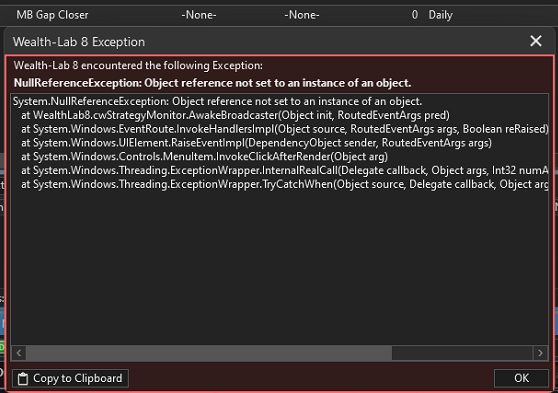
I appear to have lost the ability to open a strategy window from strategy monitor. This has been happening for a little while for both of my strategies in SM. Below is the error message. The strategy runs well as auto-trade.
Is this just my pc or a bug?
System.NullReferenceException: Object reference not set to an instance of an object.
at WealthLab8.cwStrategyMonitor.AwakeBroadcaster(Object init, RoutedEventArgs pred)
at System.Windows.EventRoute.InvokeHandlersImpl(Object source, RoutedEventArgs args, Boolean reRaised)
at System.Windows.UIElement.RaiseEventImpl(DependencyObject sender, RoutedEventArgs args)
at System.Windows.Controls.MenuItem.InvokeClickAfterRender(Object arg)
at System.Windows.Threading.ExceptionWrapper.InternalRealCall(Delegate callback, Object args, Int32 numArgs)
at System.Windows.Threading.ExceptionWrapper.TryCatchWhen(Object source, Delegate callback, Object args, Int32 numArgs, Delegate catchHandler)
Is this just my pc or a bug?
System.NullReferenceException: Object reference not set to an instance of an object.
at WealthLab8.cwStrategyMonitor.AwakeBroadcaster(Object init, RoutedEventArgs pred)
at System.Windows.EventRoute.InvokeHandlersImpl(Object source, RoutedEventArgs args, Boolean reRaised)
at System.Windows.UIElement.RaiseEventImpl(DependencyObject sender, RoutedEventArgs args)
at System.Windows.Controls.MenuItem.InvokeClickAfterRender(Object arg)
at System.Windows.Threading.ExceptionWrapper.InternalRealCall(Delegate callback, Object args, Int32 numArgs)
at System.Windows.Threading.ExceptionWrapper.TryCatchWhen(Object source, Delegate callback, Object args, Int32 numArgs, Delegate catchHandler)
Rename
Can you delete them, add back and then reopen?
No change Eugene - still getting exception report after adding them back. Also tried with different (sample) strategies - resulting in same error
Hmm. I don't have a clear understanding so let's collect some facts first.
1. Is this happening on both your computers?
2. What data provider and DataSet trigger this exception and what not?
1. Is this happening on both your computers?
2. What data provider and DataSet trigger this exception and what not?
1. happening on both PCs
2. using TD Ameritrade as broker on one PC and Dummy broker on the other
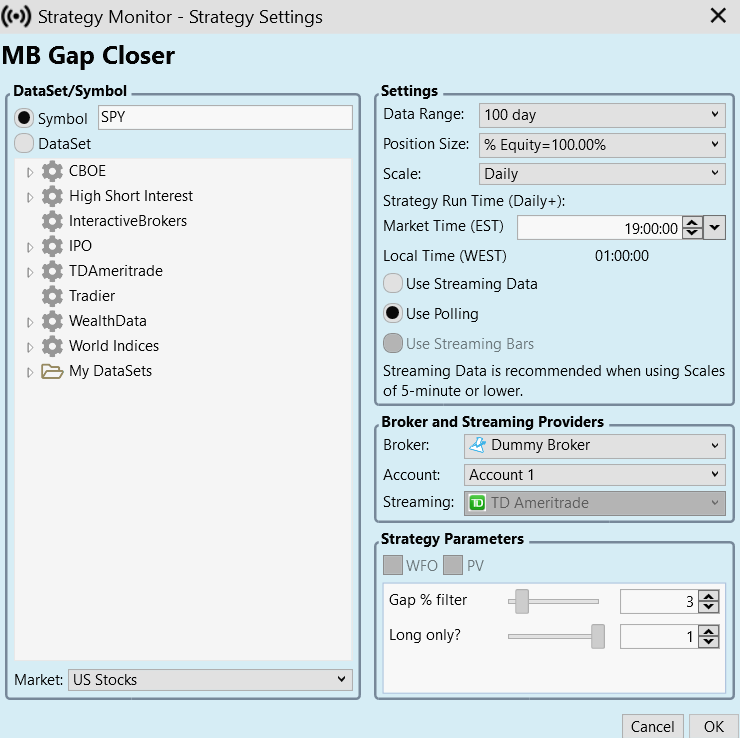
2. using TD Ameritrade as broker on one PC and Dummy broker on the other
Thank you, I'm able to reproduce this. Workaround: choose a DataSet (even containing one symbol), not Symbol.
Fixed for B39.
Thank you Eugene 😊
Please update to B39.
Your Response
Post
Edit Post
Login is required