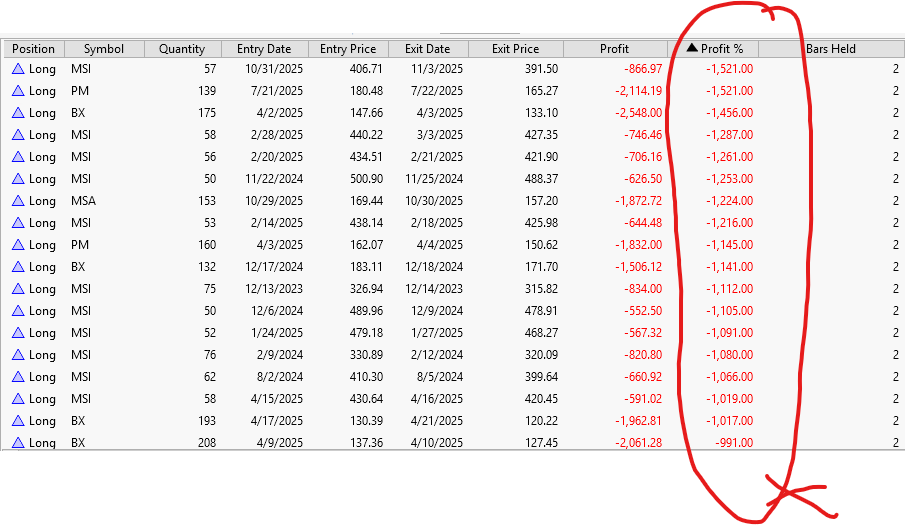
There is very strange bug in Wealthlab 8 build 151. I run a very simple program which buy stock at close and sell next day at close. And run the program on a watch list of 2000 stocks over 3 years, and then sort the "Profit %" tag under position. For large majority of trades, the "Profit %" is calculated correctly according the "Entry Price" and "Exit Price". However, there is always some trades that the "Profit %" is calculated as total wrong. Not sure what is problem. Look like there is some kinds of bugs if run on large dataset. See the attached image.
Rename
Didn't happen for me.
Possible cause is these symbols match records in Tools > Markets & Symbols. Check for matching records, or just run the strategy with Prefs (F12) > Backtest > Other Settings > Futures Mode - not checked.
If you actually want them to be futures, then select "Raw" instead of "Margin Based" for the setting below that one: Future Percent Profit.
Possible cause is these symbols match records in Tools > Markets & Symbols. Check for matching records, or just run the strategy with Prefs (F12) > Backtest > Other Settings > Futures Mode - not checked.
If you actually want them to be futures, then select "Raw" instead of "Margin Based" for the setting below that one: Future Percent Profit.
I turn off the "Futures Mode" setting and the problem goes away. It looks like there is some problems there. I didn't see any matching symbols for those stocks that have problems before under "Markets and Symbols".
Which data provider?
For a test, enable Futures Mode again and then run this on one of those symbols.
Post the Debug Log -
For a test, enable Futures Mode again and then run this on one of those symbols.
Post the Debug Log -
CODE:
using System;
using WealthLab.Backtest;
using WealthLab.Core;
using WealthLab.Data;

namespace WealthScript11
{
    public class MyStrategy : UserStrategyBase
    {
        public override void Initialize(BarHistory bars)
        {
         WriteToDebugLog($"{bars.GetDataProvider()}");
         WriteToDebugLog($"{bars.Symbol}");
         SymbolInfo si = bars.SymbolInfo;
         WriteToDebugLog($"{si.SecurityType}");
         WriteToDebugLog($"Point Value: {si.PointValue}");
        }

        public override void Execute(BarHistory bars, int idx)
        {  }
    }
}
Your Response
Post
Edit Post
Login is required