Using WL9 B12, Claude Desktop (CD) and Nodejs - all latest versions - on my Win 11 PC.
Trying to setup connection between CD & WL9's built-in MCP server.
The MCP endpoint is http://localhost:7240/mcp. Claude uses mcp-remote 0.15.1 to connect.
- The bridge starts and establishes its Streamable HTTP transport, but initialization times out. Claude reports WealthLab as "Not responding." WealthLab's Log Viewer shows no corresponding MCP request.
- The debug log shows that Claude sends an MCP initialize request advertising protocol version 2025-11-25, followed by SdkError: Request timed out.
Could you please confirm:
1. Whether Build 12 supports MCP protocol version 2025-11-25.
2. Whether the endpoint at /mcp supports Streamable HTTP as implemented by mcp-remote.
3. Whether there are any known compatibility issues with Claude Desktop or specific configuration requirements.
I can provide the relevant debug log, if needed.
Thank you.
Trying to setup connection between CD & WL9's built-in MCP server.
The MCP endpoint is http://localhost:7240/mcp. Claude uses mcp-remote 0.15.1 to connect.
- The bridge starts and establishes its Streamable HTTP transport, but initialization times out. Claude reports WealthLab as "Not responding." WealthLab's Log Viewer shows no corresponding MCP request.
- The debug log shows that Claude sends an MCP initialize request advertising protocol version 2025-11-25, followed by SdkError: Request timed out.
Could you please confirm:
1. Whether Build 12 supports MCP protocol version 2025-11-25.
2. Whether the endpoint at /mcp supports Streamable HTTP as implemented by mcp-remote.
3. Whether there are any known compatibility issues with Claude Desktop or specific configuration requirements.
I can provide the relevant debug log, if needed.
Thank you.
Rename
Thanks for the detailed report. It made this much easier to narrow down. To answer your questions:
1. Protocol 2025-11-25: Yes, it’s supported. The server negotiates that version.
2. Streamable HTTP at /mcp: Yes. We tested mcp-remote 0.15.1 on Node 22 against http://localhost:7240/mcp. It initialized, created a session and listed the tools without any problems.
3. Known compatibility issues with Claude Desktop: None that we know of. No special configuration is needed beyond the mcp-remote entry in claude_desktop_config.json.
1. Check that WealthLab is listening on the port. With WL9 running, open a Command Prompt and run:
You should see LISTENING on both 127.0.0.1:7240 and [::1]:7240. Check that the PID in the last column matches WealthLab9.exe in Task Manager (Details tab). If nothing is listening, or a different program owns the port, that’s the problem.
2. Test the endpoint without Claude. In the same Command Prompt (not PowerShell), run:
You should get back HTTP/1.1 200 OK and a line that includes "serverInfo":{"name":"WealthLab9"....
- If this works: the problem is between Claude Desktop/Node and WealthLab. Go to step 3.
- If this also hangs: something on the PC is intercepting local traffic. Antivirus “web protection” or “HTTPS scanning” features are the usual cause. Try temporarily disabling that feature, or add an exception for WealthLab9.exe and node.exe.
3. Rule out a proxy. If any HTTP_PROXY or HTTPS_PROXY environment variables are set, add NO_PROXY=localhost,127.0.0.1, or add it to the env section of the WealthLab entry in claude_desktop_config.json.
4. Start things in the right order. Start WL9 first. Then fully quit Claude Desktop from the system tray icon (closing the window leaves it running) and start it again.
If it still doesn’t connect, please post the output of steps 1 and 2 along with your mcp-remote debug log, and we’ll take it from there.
1. Protocol 2025-11-25: Yes, it’s supported. The server negotiates that version.
2. Streamable HTTP at /mcp: Yes. We tested mcp-remote 0.15.1 on Node 22 against http://localhost:7240/mcp. It initialized, created a session and listed the tools without any problems.
3. Known compatibility issues with Claude Desktop: None that we know of. No special configuration is needed beyond the mcp-remote entry in claude_desktop_config.json.
1. Check that WealthLab is listening on the port. With WL9 running, open a Command Prompt and run:
CODE:

netstat -ano | findstr 7240
You should see LISTENING on both 127.0.0.1:7240 and [::1]:7240. Check that the PID in the last column matches WealthLab9.exe in Task Manager (Details tab). If nothing is listening, or a different program owns the port, that’s the problem.
2. Test the endpoint without Claude. In the same Command Prompt (not PowerShell), run:
CODE:

curl -i -X POST http://localhost:7240/mcp -H "Content-Type: application/json" -H "Accept: application/json, text/event-stream" -d "{\"jsonrpc\":\"2.0\",\"id\":1,\"method\":\"initialize\",\"params\":{\"protocolVersion\":\"2025-11-25\",\"capabilities\":{},\"clientInfo\":{\"name\":\"test\",\"version\":\"1\"}}}"
You should get back HTTP/1.1 200 OK and a line that includes "serverInfo":{"name":"WealthLab9"....
- If this works: the problem is between Claude Desktop/Node and WealthLab. Go to step 3.
- If this also hangs: something on the PC is intercepting local traffic. Antivirus “web protection” or “HTTPS scanning” features are the usual cause. Try temporarily disabling that feature, or add an exception for WealthLab9.exe and node.exe.
3. Rule out a proxy. If any HTTP_PROXY or HTTPS_PROXY environment variables are set, add NO_PROXY=localhost,127.0.0.1, or add it to the env section of the WealthLab entry in claude_desktop_config.json.
4. Start things in the right order. Start WL9 first. Then fully quit Claude Desktop from the system tray icon (closing the window leaves it running) and start it again.
If it still doesn’t connect, please post the output of steps 1 and 2 along with your mcp-remote debug log, and we’ll take it from there.
#1,2: Check.
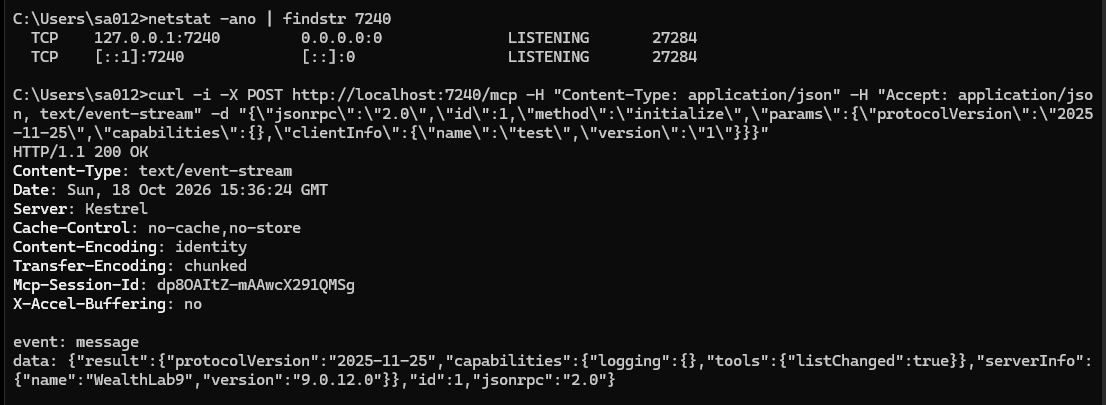
#4. Of course.
#3: Here's the entire debug of last session:
[10/19/26: log deleted, no longer required]
--------------------
I took the liberty of discussing with Claude also as it's their app... after testing a few things unsuccessfully it wanted me to post this for WLab Support that includes what we learned:
WL9 build 9.0.12.0, Windows 11, Claude Desktop (free plan). MCP server at http://localhost:7240/mcp. Direct curl POST of initialize (protocol 2025-03-26 and 2025-11-25, including Claude’s capabilities payload) returns HTTP 200 with correct serverInfo (text/event-stream), also when reusing the Mcp-Session-Id. Via mcp-remote 0.15.1 (http-first, StreamableHTTP) the bridge connects and its own handshake succeeds, but Claude Desktop’s initialize gets no reply and times out after 2 minutes (“wealthlab didn’t respond within 2 mins”). Node needed --use-system-ca for npm. What bridge or Claude Desktop config do you recommend for MCP?
#4. Of course.
#3: Here's the entire debug of last session:
[10/19/26: log deleted, no longer required]
--------------------
I took the liberty of discussing with Claude also as it's their app... after testing a few things unsuccessfully it wanted me to post this for WLab Support that includes what we learned:
WL9 build 9.0.12.0, Windows 11, Claude Desktop (free plan). MCP server at http://localhost:7240/mcp. Direct curl POST of initialize (protocol 2025-03-26 and 2025-11-25, including Claude’s capabilities payload) returns HTTP 200 with correct serverInfo (text/event-stream), also when reusing the Mcp-Session-Id. Via mcp-remote 0.15.1 (http-first, StreamableHTTP) the bridge connects and its own handshake succeeds, but Claude Desktop’s initialize gets no reply and times out after 2 minutes (“wealthlab didn’t respond within 2 mins”). Node needed --use-system-ca for npm. What bridge or Claude Desktop config do you recommend for MCP?
Thanks, Sammy. Your log shows the bridge does reach WealthLab: mcp-remote’s own handshake succeeds (“Connected to remote server”). The run you captured was a manual test that exited 3 ms after sending initialize, before WealthLab could reply, so it doesn’t show the failure. The empty Log Viewer is expected because WL9 doesn’t log MCP traffic, and nothing in the MCP server changed between B12 and B13.
We tested mcp-remote 0.15.1 with Claude Desktop’s initialize payload, sent the moment the bridge starts, and WL9 replied in under 100 ms every time. So the issue looks to be on the Claude Desktop side of the bridge. Please:
1. Test the bridge interactively. In a Command Prompt, run
mcp-remote http://localhost:7240/mcp --debug
After “Proxy established successfully”, paste this and press Enter, leaving the window open. You should see a reply from WealthLab9.
2. Post Claude Desktop’s mcp-server-<name>.log, where <name> is the server name in your config. It’s in
%APPDATA%\Claude\logs\
or, for the Microsoft Store version, under
%LOCALAPPDATA%\Packages\Claude_*\LocalCache\Roaming\Claude\logs\
3. Post your claude_desktop_config.json entry for WealthLab. For comparison, here’s the configuration we tested:
We tested mcp-remote 0.15.1 with Claude Desktop’s initialize payload, sent the moment the bridge starts, and WL9 replied in under 100 ms every time. So the issue looks to be on the Claude Desktop side of the bridge. Please:
1. Test the bridge interactively. In a Command Prompt, run
mcp-remote http://localhost:7240/mcp --debug
After “Proxy established successfully”, paste this and press Enter, leaving the window open. You should see a reply from WealthLab9.
CODE:

{"jsonrpc":"2.0","id":0,"method":"initialize","params":{"protocolVersion":"2025-11-25","capabilities":{},"clientInfo":{"name":"test","version":"1"}}}
2. Post Claude Desktop’s mcp-server-<name>.log, where <name> is the server name in your config. It’s in
%APPDATA%\Claude\logs\
or, for the Microsoft Store version, under
%LOCALAPPDATA%\Packages\Claude_*\LocalCache\Roaming\Claude\logs\
3. Post your claude_desktop_config.json entry for WealthLab. For comparison, here’s the configuration we tested:
CODE:

"wealthlab": {
  "command": "npx",
  "args": ["-y", "mcp-remote@0.15.1", "http://localhost:7240/mcp", "--debug"],
  "env": { "NODE_OPTIONS": "--use-system-ca" }
}
After I posted
The filename, directory name, or volume label syntax is incorrect.
---------------------
Meanwhile, can I delete the detailed log I posted in the previous post just in case it has some personally identifiable information?
QUOTE:in the Command prompt, got this msg:
{"jsonrpc":"2.0","id":0,"method":"initialize","params":{"protocolVersion":"2025-11-25","capabilities":{},"clientInfo":{"name":"test","version":"1"}}}
The filename, directory name, or volume label syntax is incorrect.
---------------------
Meanwhile, can I delete the detailed log I posted in the previous post just in case it has some personally identifiable information?
That message comes from the Command Prompt itself, which means the JSON reached the prompt rather than mcp-remote. mcp-remote only reads that line while it’s still running. If the C:\> prompt is back, mcp-remote has already exited.
Please try again:
1. Run mcp-remote http://localhost:7240/mcp --debug.
2. Wait for “Proxy established successfully”. There should be no C:\> prompt after it.
3. Paste the JSON into that same window and press Enter.
If the prompt comes back on its own before you can paste, mcp-remote is exiting at startup. Please post the last 20 or so lines it printed.
And yes, feel free to delete or edit the log. The only personal detail in it is your Windows username in the file paths (C:\Users\sa012\...). It contains no passwords or tokens: the “Token result: Not found” lines just mean no OAuth token exists.
If mcp-remote is exiting at startup, that alone could explain his Claude Desktop failure, so the lines it prints before exiting are the key information.
Please try again:
1. Run mcp-remote http://localhost:7240/mcp --debug.
2. Wait for “Proxy established successfully”. There should be no C:\> prompt after it.
3. Paste the JSON into that same window and press Enter.
If the prompt comes back on its own before you can paste, mcp-remote is exiting at startup. Please post the last 20 or so lines it printed.
And yes, feel free to delete or edit the log. The only personal detail in it is your Windows username in the file paths (C:\Users\sa012\...). It contains no passwords or tokens: the “Token result: Not found” lines just mean no OAuth token exists.
If mcp-remote is exiting at startup, that alone could explain his Claude Desktop failure, so the lines it prints before exiting are the key information.
I'll get back to you.
Meanwhile, I deleted the log.
Meanwhile, I deleted the log.
Did steps 1-3 as advised (in the morning I'd actually hit Enter after step 1 believing that I was supposed to see the C:\ prompt).
Here's the last 20 or so lines from the mcp-server-wealthlab log (BTW, it's in ..\AppData\Local\Claude\logs):
[10/19/26, 9:13pm: log deleted, no longer required]
Lastly, here's my config (includes no proxy argument):
Here's the last 20 or so lines from the mcp-server-wealthlab log (BTW, it's in ..\AppData\Local\Claude\logs):
[10/19/26, 9:13pm: log deleted, no longer required]
Lastly, here's my config (includes no proxy argument):
QUOTE:
"wealthlab": {
"command": "cmd",
"args": ["/c", "mcp-remote", "http://localhost:7240/mcp"],
"env": {
"NODE_OPTIONS": "--use-system-ca",
"NO_PROXY": "localhost,127.0.0.1"
}
Thanks, Sammy, that log is very useful. It shows Claude Desktop sending initialize, and mcp-remote stalling while it connects to WealthLab (“Using transport strategy: http-first” is the last line before Claude gives up after 2 minutes). When you ran it by hand, the same step took about 50 ms. So it only stalls when Claude Desktop launches it. We ran it the same way here (cmd /c, the same message) and it connected and got WealthLab’s reply in under a second.
Please try this config: it removes NODE_OPTIONS and adds --debug. --use-system-ca is only needed for npm downloads, not for connecting to localhost.
Fully quit Claude Desktop from the system tray, start it again, and check the connection.
If it still times out, please post:
- The newest *_debug.log from %USERPROFILE%\.mcp-auth\ (replace your username in the paths). It has precise timestamps, so it shows exactly where the 2 minutes go.
- Whether your Command Prompt test this morning returned a reply from WealthLab9 after you pasted the JSON.
Please try this config: it removes NODE_OPTIONS and adds --debug. --use-system-ca is only needed for npm downloads, not for connecting to localhost.
CODE:

"wealthlab": {
  "command": "cmd",
  "args": ["/c", "mcp-remote", "http://localhost:7240/mcp", "--debug"],
  "env": { "NO_PROXY": "localhost,127.0.0.1" }
}
Fully quit Claude Desktop from the system tray, start it again, and check the connection.
If it still times out, please post:
- The newest *_debug.log from %USERPROFILE%\.mcp-auth\ (replace your username in the paths). It has precise timestamps, so it shows exactly where the 2 minutes go.
- Whether your Command Prompt test this morning returned a reply from WealthLab9 after you pasted the JSON.
Modified the config file to (I kept the no proxy line, for safety):
Connection still failed. Here's the last 20-30 lines of the new log:
[10/19/26, 9:13pm: log deleted, no longer required]
-----------------------------
You want me to keep your config or revert to the old one?
QUOTE:
"wealthlab": {
"command": "npx",
"args": ["-y", "mcp-remote@0.15.1", "http://localhost:7240/mcp", "--debug"],
"env": {
"NODE_OPTIONS": "--use-system-ca",
"NO_PROXY": "localhost,127.0.0.1"
}
}
Connection still failed. Here's the last 20-30 lines of the new log:
[10/19/26, 9:13pm: log deleted, no longer required]
-----------------------------
You want me to keep your config or revert to the old one?
Config changed to:
Also failed.
Full log from C:\Users\sa012\.mcp-auth\mcp-remote-v1:
[10/19/26, 9:13pm: log deleted, no longer required]
QUOTE:
"wealthlab": {
"command": "cmd",
"args": ["/c", "mcp-remote", "http://localhost:7240/mcp", "--debug"],
"env": { "NO_PROXY": "localhost,127.0.0.1" }
}
Also failed.
Full log from C:\Users\sa012\.mcp-auth\mcp-remote-v1:
[10/19/26, 9:13pm: log deleted, no longer required]
Solved! (I think)
In my antivirus/security software I reset the Traffic Rules (there must be 50-100 of them) to default. Ran Claude and it shows the wealthlab MCP server as running - what a welcome sight!
Here's my current Claude config file in case it helps someone:
Thanks for the assistance, Glitch.
P.S. I'll probably be back with a few questions.
P.P.S. Deleted old logs for privacy as they're no longer needed.
In my antivirus/security software I reset the Traffic Rules (there must be 50-100 of them) to default. Ran Claude and it shows the wealthlab MCP server as running - what a welcome sight!
Here's my current Claude config file in case it helps someone:
CODE:
  "mcpServers": {
    "wealthlab": {
      "command": "cmd",
      "args": ["/c", "mcp-remote", "http://localhost:7240/mcp"],
      "env": {
        "NODE_OPTIONS": "--use-system-ca",
        "NO_PROXY": "localhost,127.0.0.1"
      }
    }
  },
Thanks for the assistance, Glitch.
P.S. I'll probably be back with a few questions.
P.P.S. Deleted old logs for privacy as they're no longer needed.
Have fun exploring this new frontier!
It's cool - and fun!
-------------------
WLab features/ AI page (https://www.wealth-lab.com/Software/Features/AI) mentions a plugin: WealthLab-Core. It's not shown when I do a search for it in Claude, nor is it listed here on WLab website under Extensions. How do I get/install it?
-------------------
WLab features/ AI page (https://www.wealth-lab.com/Software/Features/AI) mentions a plugin: WealthLab-Core. It's not shown when I do a search for it in Claude, nor is it listed here on WLab website under Extensions. How do I get/install it?
It's still in the works, it's being developed by a third party. Cone snuck it in there in the last web page update!
Ok.
Just to clarify... If one uses Strategy Generator AI in the side panel of a new or existing strategy it takes WealthBits but if one uses Claude to review/modify/create a new strategy via the MCP connection there's no WealthBit usage involved, right?
Just to clarify... If one uses Strategy Generator AI in the side panel of a new or existing strategy it takes WealthBits but if one uses Claude to review/modify/create a new strategy via the MCP connection there's no WealthBit usage involved, right?
Your Response
Post
Edit Post
Login is required