Just installed WLab 9 (B8, the latest build) plus all extensions I use in WL8. Migrated WL8 stuff over.
Noticed a few issues right away (more may follow):
1. WL9 icon is identical to WL8's making them impossible to distinguish. Plz use a different color scheme/ background/ superimpose 9, etc. for the WL9 icon.
2. I have a 2-monitor setup. I prefer the right one but WL9 starts on the non-preferred monitor (left). Also, it starts maximized. I tried moving it to Rt one and re-sizing in the hope it remembers but it *still* opens maximized on Lt, I have to click on the window sizing button on top right to have it go to its preferred location.
I'd reported this issue 2yrs ago when it appeared after an update in WL8 (https://www.wealth-lab.com/Discussion/App-starts-on-non-preferred-monitor-after-upgrade-to-B95-11500) and it was fixed, but has again re-surfaced. Plz fix.
3. Unnecessary items on desktop: I find the Recent Strategies and Social Media icons on the desktop distracting, intrusive and, quite frankly, obnoxious. They're even present in custom Workspaces... they just don't go away! Plz place them in the Baseline Workspace as in WL8, or give users a choice via Preferences to disable them.
4. Missing custom indicators folder: I used to keep indicators I created in MyIndicators folder. 2 issues:
a) MyIndicators folder has disappeared and the indicators have been mixed with all others under the broad Indicators category. How to restore MyIndicators folder and place them there?
b) WL9 often fails to load one or more while starting (before you ask, I have given it Admin privileges just like WL8)... it shows a message. This will likely break some of my strategies. Plz fix.
5. In WL8, the selected tab/item is highlighted in blue, not so in WL9. Will be nice to have it so (or some other nice color).
6. I've seen the following error in log viewer more than once in the very short time I've used WL9:

What does it mean? How to fix??
I'll rest here even though there are more issues to report.
Noticed a few issues right away (more may follow):
1. WL9 icon is identical to WL8's making them impossible to distinguish. Plz use a different color scheme/ background/ superimpose 9, etc. for the WL9 icon.
2. I have a 2-monitor setup. I prefer the right one but WL9 starts on the non-preferred monitor (left). Also, it starts maximized. I tried moving it to Rt one and re-sizing in the hope it remembers but it *still* opens maximized on Lt, I have to click on the window sizing button on top right to have it go to its preferred location.
I'd reported this issue 2yrs ago when it appeared after an update in WL8 (https://www.wealth-lab.com/Discussion/App-starts-on-non-preferred-monitor-after-upgrade-to-B95-11500) and it was fixed, but has again re-surfaced. Plz fix.
3. Unnecessary items on desktop: I find the Recent Strategies and Social Media icons on the desktop distracting, intrusive and, quite frankly, obnoxious. They're even present in custom Workspaces... they just don't go away! Plz place them in the Baseline Workspace as in WL8, or give users a choice via Preferences to disable them.
4. Missing custom indicators folder: I used to keep indicators I created in MyIndicators folder. 2 issues:
a) MyIndicators folder has disappeared and the indicators have been mixed with all others under the broad Indicators category. How to restore MyIndicators folder and place them there?
b) WL9 often fails to load one or more while starting (before you ask, I have given it Admin privileges just like WL8)... it shows a message. This will likely break some of my strategies. Plz fix.
5. In WL8, the selected tab/item is highlighted in blue, not so in WL9. Will be nice to have it so (or some other nice color).
6. I've seen the following error in log viewer more than once in the very short time I've used WL9:
What does it mean? How to fix??
I'll rest here even though there are more issues to report.
Rename
1. The WL8/WL9 icon similarity is noted. We can look at differentiating the WL9 icon more clearly.
2. We'll investigate the window position/state issue. WL9 should remember its last position and state, including on a multi-monitor setup.
3. Recent Strategies and Social Media are intentional parts of the WL9 desktop. That said, I can see the case for allowing them to be hidden, particularly in a custom Workspace, so we'll consider that as an enhancement.
4. My Indicators: WL9 still has a My Indicators folder. However, custom indicators from WL8 need to be migrated individually to WL9. They aren't automatically transferred as part of the WL9 installation. If a particular indicator fails when you migrate it, please post that indicator and the error you're receiving so we can look at the specific problem.
5. The selected-tab appearance is part of the WL9 UI/theme changes. We'll consider making the active tab more visually distinct.
6. The Log Viewer message indicates that WL9's MCP server couldn't bind to its local port because the address/port was already in use. Possible causes include another WL9 instance still running, another application using the same port, or a previous process that hasn't completely terminated and released the port, or maybe a firewall issue.
The MCP server is only used to allow external AI clients such as Claude to communicate with WealthLab through MCP. Failure to start it has no impact on Strategies, backtesting, trading, data, or normal WealthLab operation. If you're not using an external MCP connection, you can simply ignore the message. If you are using MCP, we'd need to determine which process currently owns the port.
For any additional issues, please report them individually with enough information to reproduce them. In particular, screenshots of an error by themselves aren't always sufficient; the steps that led to the error, relevant settings, and associated Log Viewer details make it much easier for us to investigate.
2. We'll investigate the window position/state issue. WL9 should remember its last position and state, including on a multi-monitor setup.
3. Recent Strategies and Social Media are intentional parts of the WL9 desktop. That said, I can see the case for allowing them to be hidden, particularly in a custom Workspace, so we'll consider that as an enhancement.
4. My Indicators: WL9 still has a My Indicators folder. However, custom indicators from WL8 need to be migrated individually to WL9. They aren't automatically transferred as part of the WL9 installation. If a particular indicator fails when you migrate it, please post that indicator and the error you're receiving so we can look at the specific problem.
5. The selected-tab appearance is part of the WL9 UI/theme changes. We'll consider making the active tab more visually distinct.
6. The Log Viewer message indicates that WL9's MCP server couldn't bind to its local port because the address/port was already in use. Possible causes include another WL9 instance still running, another application using the same port, or a previous process that hasn't completely terminated and released the port, or maybe a firewall issue.
The MCP server is only used to allow external AI clients such as Claude to communicate with WealthLab through MCP. Failure to start it has no impact on Strategies, backtesting, trading, data, or normal WealthLab operation. If you're not using an external MCP connection, you can simply ignore the message. If you are using MCP, we'd need to determine which process currently owns the port.
For any additional issues, please report them individually with enough information to reproduce them. In particular, screenshots of an error by themselves aren't always sufficient; the steps that led to the error, relevant settings, and associated Log Viewer details make it much easier for us to investigate.
Thanks, looking forward to the fixes/enhancements.
4.
Plz detail the steps. Also, will I have to *first* delete them from the "Indicators' folder/tab in WL9 in order to avoid conflicts?
5. Maybe you can make tab highlight theme-dependent e.g. the current subtle gray highlight perhaps works well with Light theme but is almost invisible with the Dark theme.
6. I'm not using the MCP server. The only explanation I can think of is that WL9 froze multiple times when I was testing my custom workspaces (the migration to WL9 was not trouble-free e.g. simple charts didn't migrate... I'm working on each workspace by recreating/saving, it's painstaking) and I had to close it down & restart. IF that's the case, perhaps WL9 should flush-out such settings so they don't carry over to the next session.
4.
QUOTE:
custom indicators from WL8 need to be migrated individually to WL9
Plz detail the steps. Also, will I have to *first* delete them from the "Indicators' folder/tab in WL9 in order to avoid conflicts?
5. Maybe you can make tab highlight theme-dependent e.g. the current subtle gray highlight perhaps works well with Light theme but is almost invisible with the Dark theme.
6. I'm not using the MCP server. The only explanation I can think of is that WL9 froze multiple times when I was testing my custom workspaces (the migration to WL9 was not trouble-free e.g. simple charts didn't migrate... I'm working on each workspace by recreating/saving, it's painstaking) and I had to close it down & restart. IF that's the case, perhaps WL9 should flush-out such settings so they don't carry over to the next session.
A couple more points:
7. ScottPlot: Not included in WL9. All my strategies using SP were broken. Fortunately, copying the dll from WL8 to WL9 resolved the issue. Thought you'd like to know.
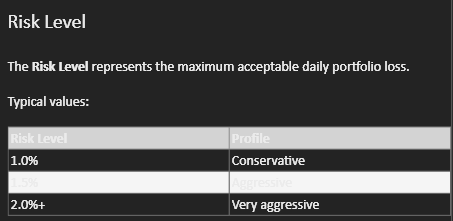
8. Markdown whiteout: While the version of md included in WL9 is the same as WL8, it's behavior is a bit different - it's creating whiteout of text in selected areas when using the Dark theme, as in this screenshot of the Help file:
It's also affecting Strategy descriptions.
I'd mentioned this 18 months ago here: https://www.wealth-lab.com/Discussion/Folder-Name-Whiteout-in-B114-12281#post2. It was fixed but has resurfaced. Plz fix.
And for some good news:
4. My Indicators folder has magically appeared and all my custom indicators were auto-placed inside it - yay! I was dreading having to re-create each indicator (shudder).
7. ScottPlot: Not included in WL9. All my strategies using SP were broken. Fortunately, copying the dll from WL8 to WL9 resolved the issue. Thought you'd like to know.
8. Markdown whiteout: While the version of md included in WL9 is the same as WL8, it's behavior is a bit different - it's creating whiteout of text in selected areas when using the Dark theme, as in this screenshot of the Help file:
It's also affecting Strategy descriptions.
I'd mentioned this 18 months ago here: https://www.wealth-lab.com/Discussion/Folder-Name-Whiteout-in-B114-12281#post2. It was fixed but has resurfaced. Plz fix.
And for some good news:
4. My Indicators folder has magically appeared and all my custom indicators were auto-placed inside it - yay! I was dreading having to re-create each indicator (shudder).
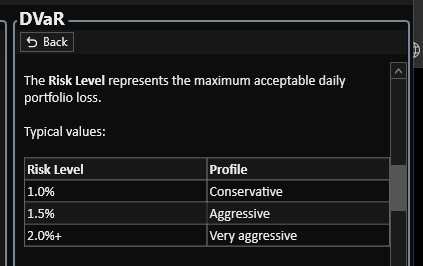
Thenks for pointing out the theming issue with the table headers, we have it fixed! If you notice any other theming problems let us know.
👍
#5 is also theme-related. I'll keep an eye out for others.
On a side note, when using the Ultra Dark theme, when you click on a column the up/down arrows are virtually invisible as they're black, you may want to fix that, too. Issue is present in WL8 also (I never created a ticket for it... if you're fixing theming issues you might as well fix that, too).
#5 is also theme-related. I'll keep an eye out for others.
On a side note, when using the Ultra Dark theme, when you click on a column the up/down arrows are virtually invisible as they're black, you may want to fix that, too. Issue is present in WL8 also (I never created a ticket for it... if you're fixing theming issues you might as well fix that, too).
I have the sort arrows theme-aware now, so they will appear as light triangles in the dark themes. We also have the unselected tabs a lighter color now in the dark themes so the selected tab stands out much more clearly.
Updated to WL9b9. This is what I noticed:
#8 (text whiteout): fixed.
#5 (theme-aware coloring): only partially fixed -> the sort arrows now have good contrast in both Dark and Ultra Dark themes. Can you please port this over to WL8 also? TIA.
Thx for these.
As for the rest (#s 1,2,3), including #5 (color/contrast of tabs) - do you have an ETA for these?
#8 (text whiteout): fixed.
#5 (theme-aware coloring): only partially fixed -> the sort arrows now have good contrast in both Dark and Ultra Dark themes. Can you please port this over to WL8 also? TIA.
Thx for these.
As for the rest (#s 1,2,3), including #5 (color/contrast of tabs) - do you have an ETA for these?
In the latest build, de-delected tabs in dark mode now appear faded, and the text also has a reduced opacity. This makes the selected tab stand out more. Did you notice this change? We don't have an ETA for the other items you mentioned.
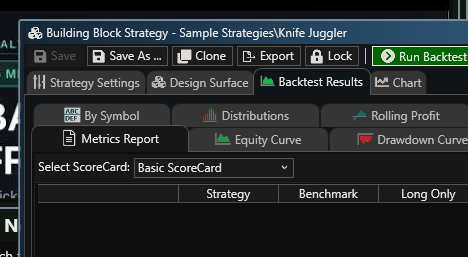

The Strategies tab is selected in both. The difference is night and day.
-------------------------------
#2: The code already exits in WL8, you just have to copy it over (as also for #5, above).
Those are toolbar buttons and we were talking about tabs. We removed the three DataSets/Indicators/Strategies state-aware toolbar buttons that were in WL8 from WL9. Instead we added a button we felt was more important and less redundant, name Accounts. Since there was still some room in the toolbar, in Build 9 we re-introduced a (non-state aware) Strategies button a little farther left in the toolbar than the original WL8 design.
I'd meant the toolbar buttons, my bad. Personally, I found the coloring useful.
--------------
#3: Unnecessary items on desktop: Some other thoughts came to mind; to summarize:
- eliminate them except from inside Baseline workspace (WL8 behavior)
- eliminate from custom workspaces, including when the Baseline workspace is closed
- user-selectable choice under Preferences to disable them everywhere
- if it's your strong desire to keep them, perhaps after an interval (?15 secs, ?30 secs) they can dim significantly or, even better, they auto-hide/rollup and a click can make them full-sized again (and the countdown timer starts again) - this should satisfy your desire to keep them yet make them non-obtrusive
- (added later) Put them on the toolbar (there's plenty of space) - always visible yet out of the way
--------------
#3: Unnecessary items on desktop: Some other thoughts came to mind; to summarize:
- eliminate them except from inside Baseline workspace (WL8 behavior)
- eliminate from custom workspaces, including when the Baseline workspace is closed
- user-selectable choice under Preferences to disable them everywhere
- if it's your strong desire to keep them, perhaps after an interval (?15 secs, ?30 secs) they can dim significantly or, even better, they auto-hide/rollup and a click can make them full-sized again (and the countdown timer starts again) - this should satisfy your desire to keep them yet make them non-obtrusive
- (added later) Put them on the toolbar (there's plenty of space) - always visible yet out of the way
Starting in Build 10 WL9 will properly restore to multi-monitor, even when maximized, correct non-maximized size will be respected, and if the other monitor is no longer available should still restore to a valid monitor location.
Can't wait
Thx for fixing the multi-monitor issue in WL9B10 !!
Hopefully, you'll tackle #3 soon, see Post #12 for a number of suggested solutions.
-------------------------------------------
A couple of observations:
a) It'll be nice to have the entire release note blog, alongwith release dates, shown in the Baseline workspace - just like in WL8. It's useful to review periodically.
b) Metrics History Visualizer: Released in B10 for Str. Rankings tool... will be super useful in individual strategies as well.
On a side note, the tooltip box for 'No Parallel Processing' in Str. Rankings tool is empty.
Hopefully, you'll tackle #3 soon, see Post #12 for a number of suggested solutions.
-------------------------------------------
A couple of observations:
a) It'll be nice to have the entire release note blog, alongwith release dates, shown in the Baseline workspace - just like in WL8. It's useful to review periodically.
b) Metrics History Visualizer: Released in B10 for Str. Rankings tool... will be super useful in individual strategies as well.
On a side note, the tooltip box for 'No Parallel Processing' in Str. Rankings tool is empty.
a) I think we'll add an option to the View menu to hide those items.
b) Oh, we set the tooltip to a blank string if there are no reasons to prohibit parallel processing. Otherwise the tooltip explains the reasons. I'll need to change it to null instead of a blank string.
b) Oh, we set the tooltip to a blank string if there are no reasons to prohibit parallel processing. Otherwise the tooltip explains the reasons. I'll need to change it to null instead of a blank string.
And regarding putting Metric History in the main Strategy window, running a series of rolling window backtests was something DrKoch was hoping we'd introduce directly into WL9. It's a major overhaul and would require changes to many of the Visualizers to support it properly. It would be valuable for sure and is still on the to-do list for the future.
👍👍
------------------
(Off-topic)
Strategy Rankings tool: Currently, Strategy Rankings and Symbol Rankings share the Symbol/DataSet dropdown selection so the choice gets applied to both. It would be very useful to each have independent choice. Reason: Say you run the Symbol Rankings against a dataset and find some promising symbols but you want to check them against other strategies so you switch to the Strategy Rankings tab. The moment you change from Dataset to Symbol input the results in Symbol Rankings you just ran get wiped out (you find this out when you switch to that tab to check for more symbols); if the 2 tabs had independent choice, the Symbol Rankings will retain its results from the Dataset mode even as you keep checking individual symbols in the Strategy Rankings tab using Symbol mode.
------------------
(Off-topic)
Strategy Rankings tool: Currently, Strategy Rankings and Symbol Rankings share the Symbol/DataSet dropdown selection so the choice gets applied to both. It would be very useful to each have independent choice. Reason: Say you run the Symbol Rankings against a dataset and find some promising symbols but you want to check them against other strategies so you switch to the Strategy Rankings tab. The moment you change from Dataset to Symbol input the results in Symbol Rankings you just ran get wiped out (you find this out when you switch to that tab to check for more symbols); if the 2 tabs had independent choice, the Symbol Rankings will retain its results from the Dataset mode even as you keep checking individual symbols in the Strategy Rankings tab using Symbol mode.
Just updated to B11 (latest). A few points:
- #3 (unnecessary items on desktop) still hasn't been implemented, hope you do so in the next build or two so I can dive into WL9 with full gusto.
- Plz add the *full* Release Highlights blog to the Baseline Workspace/Home Page. *OR* you can tuck it under Help menu, this would open a floating window (like the Help window)... this might be the better option as one will be able access it from any workspace. The blog is *vital* and is perhaps the only place one can easily discover significant changes.
- Bug: (Since I'm too lazy to create a new ticket I thought I would add it here...) Clicking on Preferences, or F12, is not working; there's an error msg at the bottom: "WL9: Object reference not set to an instance of an object".
- #3 (unnecessary items on desktop) still hasn't been implemented, hope you do so in the next build or two so I can dive into WL9 with full gusto.
- Plz add the *full* Release Highlights blog to the Baseline Workspace/Home Page. *OR* you can tuck it under Help menu, this would open a floating window (like the Help window)... this might be the better option as one will be able access it from any workspace. The blog is *vital* and is perhaps the only place one can easily discover significant changes.
- Bug: (Since I'm too lazy to create a new ticket I thought I would add it here...) Clicking on Preferences, or F12, is not working; there's an error msg at the bottom: "WL9: Object reference not set to an instance of an object".
Hi Sammy,
We haven't forgotten about the option to hide the Recent Strategies and Social Media sections from the desktop. We'll get to that in a future build.
We don't plan to maintain the full release note history on the WL9 Home Page any longer. You can find the complete history on our website under Software, Release Notes. The Home Page will focus on highlighting the latest changes.
Regarding the Preferences error, could you open the Log Viewer and paste the full stack trace associated with that exception? That should help us pinpoint what's causing it.
We haven't forgotten about the option to hide the Recent Strategies and Social Media sections from the desktop. We'll get to that in a future build.
We don't plan to maintain the full release note history on the WL9 Home Page any longer. You can find the complete history on our website under Software, Release Notes. The Home Page will focus on highlighting the latest changes.
Regarding the Preferences error, could you open the Log Viewer and paste the full stack trace associated with that exception? That should help us pinpoint what's causing it.
Re: Release note history I do believe the best place would be under the Help menu. It also conforms to the current practice by most software.
Re: Error Screenshot below:

Re: Error Screenshot below:
If you click that error, there should be details below it.
Just right click the row, "Copy Message Details to Clipboard". Paste here .
Just right click the row, "Copy Message Details to Clipboard". Paste here .
Here you are:
10/9/2026 13:22:14:263
WL9
Object reference not set to an instance of an object.
NullReferenceException
Object reference not set to an instance of an object.
at WealthLab.Candlesticks.CandleSettingsManager.get_CandleSettingsNames()
at WealthLab.Candlesticks.prefCandlesticks.Initialize()
at WealthLab9.cwPreferences.Initialize()
at WealthLab9.MainWindow.AllocateSimplePredicate(String info, ImageSource second, ChildWindow consumer, Boolean ismap2)
at WealthLab9.MainWindow.AssignRandomWorker(String instance, String connection, ChildWindow dic, Boolean ispred2)
at WealthLab9.MainWindow.ShowPreferencesWindow(String startPage)
at WealthLab9.MainWindow.ShowPreferences(String startPage)
at WealthLab9.MainWindow.AssignReadableAuditor(Object asset, ExecutedRoutedEventArgs result)
at System.Windows.Input.CommandBinding.OnExecuted(Object sender, ExecutedRoutedEventArgs e)
at System.Windows.Input.CommandManager.HandleCommandBinding(Object sender, RoutedEventArgs e, CommandBinding commandBinding, Boolean execute)
at System.Windows.Input.CommandManager.FindCommandBinding(CommandBindingCollection commandBindings, Object sender, RoutedEventArgs e, ICommand command, Boolean execute)
at System.Windows.Input.CommandManager.FindCommandBinding(Object sender, RoutedEventArgs e, ICommand command, Boolean execute)
at System.Windows.Input.CommandManager.OnExecuted(Object sender, ExecutedRoutedEventArgs e)
at System.Windows.RoutedEventArgs.InvokeHandler(Delegate handler, Object target)
at System.Windows.EventRoute.InvokeHandlersImpl(Object source, RoutedEventArgs args, Boolean reRaised)
at System.Windows.UIElement.RaiseEventImpl(DependencyObject sender, RoutedEventArgs args)
at System.Windows.Input.RoutedCommand.ExecuteImpl(Object parameter, IInputElement target, Boolean userInitiated)
at MS.Internal.Commands.CommandHelpers.CriticalExecuteCommandSource(ICommandSource commandSource, Boolean userInitiated)
at System.Windows.Controls.Button.OnClick()
at WealthLab.WPF.WLButton.OnClick()
at System.Windows.Controls.Primitives.ButtonBase.OnMouseLeftButtonUp(MouseButtonEventArgs e)
at System.Windows.RoutedEventArgs.InvokeHandler(Delegate handler, Object target)
at System.Windows.EventRoute.InvokeHandlersImpl(Object source, RoutedEventArgs args, Boolean reRaised)
at System.Windows.UIElement.ReRaiseEventAs(DependencyObject sender, RoutedEventArgs args, RoutedEvent newEvent)
at System.Windows.RoutedEventArgs.InvokeHandler(Delegate handler, Object target)
at System.Windows.EventRoute.InvokeHandlersImpl(Object source, RoutedEventArgs args, Boolean reRaised)
at System.Windows.UIElement.RaiseEventImpl(DependencyObject sender, RoutedEventArgs args)
at System.Windows.UIElement.RaiseTrustedEvent(RoutedEventArgs args)
at System.Windows.Input.InputManager.ProcessStagingArea()
at System.Windows.Input.InputProviderSite.ReportInput(InputReport inputReport)
at System.Windows.Interop.HwndMouseInputProvider.ReportInput(IntPtr hwnd, InputMode mode, Int32 timestamp, RawMouseActions actions, Int32 x, Int32 y, Int32 wheel)
at System.Windows.Interop.HwndMouseInputProvider.FilterMessage(IntPtr hwnd, WindowMessage msg, IntPtr wParam, IntPtr lParam, Boolean& handled)
at System.Windows.Interop.HwndSource.InputFilterMessage(IntPtr hwnd, Int32 msg, IntPtr wParam, IntPtr lParam, Boolean& handled)
at MS.Win32.HwndWrapper.WndProc(IntPtr hwnd, Int32 msg, IntPtr wParam, IntPtr lParam, Boolean& handled)
at System.Windows.Threading.ExceptionWrapper.InternalRealCall(Delegate callback, Object args, Int32 numArgs)
at System.Windows.Threading.ExceptionWrapper.TryCatchWhen(Object source, Delegate callback, Object args, Int32 numArgs, Delegate catchHandler)
10/9/2026 13:22:14:263
WL9
Object reference not set to an instance of an object.
NullReferenceException
Object reference not set to an instance of an object.
at WealthLab.Candlesticks.CandleSettingsManager.get_CandleSettingsNames()
at WealthLab.Candlesticks.prefCandlesticks.Initialize()
at WealthLab9.cwPreferences.Initialize()
at WealthLab9.MainWindow.AllocateSimplePredicate(String info, ImageSource second, ChildWindow consumer, Boolean ismap2)
at WealthLab9.MainWindow.AssignRandomWorker(String instance, String connection, ChildWindow dic, Boolean ispred2)
at WealthLab9.MainWindow.ShowPreferencesWindow(String startPage)
at WealthLab9.MainWindow.ShowPreferences(String startPage)
at WealthLab9.MainWindow.AssignReadableAuditor(Object asset, ExecutedRoutedEventArgs result)
at System.Windows.Input.CommandBinding.OnExecuted(Object sender, ExecutedRoutedEventArgs e)
at System.Windows.Input.CommandManager.HandleCommandBinding(Object sender, RoutedEventArgs e, CommandBinding commandBinding, Boolean execute)
at System.Windows.Input.CommandManager.FindCommandBinding(CommandBindingCollection commandBindings, Object sender, RoutedEventArgs e, ICommand command, Boolean execute)
at System.Windows.Input.CommandManager.FindCommandBinding(Object sender, RoutedEventArgs e, ICommand command, Boolean execute)
at System.Windows.Input.CommandManager.OnExecuted(Object sender, ExecutedRoutedEventArgs e)
at System.Windows.RoutedEventArgs.InvokeHandler(Delegate handler, Object target)
at System.Windows.EventRoute.InvokeHandlersImpl(Object source, RoutedEventArgs args, Boolean reRaised)
at System.Windows.UIElement.RaiseEventImpl(DependencyObject sender, RoutedEventArgs args)
at System.Windows.Input.RoutedCommand.ExecuteImpl(Object parameter, IInputElement target, Boolean userInitiated)
at MS.Internal.Commands.CommandHelpers.CriticalExecuteCommandSource(ICommandSource commandSource, Boolean userInitiated)
at System.Windows.Controls.Button.OnClick()
at WealthLab.WPF.WLButton.OnClick()
at System.Windows.Controls.Primitives.ButtonBase.OnMouseLeftButtonUp(MouseButtonEventArgs e)
at System.Windows.RoutedEventArgs.InvokeHandler(Delegate handler, Object target)
at System.Windows.EventRoute.InvokeHandlersImpl(Object source, RoutedEventArgs args, Boolean reRaised)
at System.Windows.UIElement.ReRaiseEventAs(DependencyObject sender, RoutedEventArgs args, RoutedEvent newEvent)
at System.Windows.RoutedEventArgs.InvokeHandler(Delegate handler, Object target)
at System.Windows.EventRoute.InvokeHandlersImpl(Object source, RoutedEventArgs args, Boolean reRaised)
at System.Windows.UIElement.RaiseEventImpl(DependencyObject sender, RoutedEventArgs args)
at System.Windows.UIElement.RaiseTrustedEvent(RoutedEventArgs args)
at System.Windows.Input.InputManager.ProcessStagingArea()
at System.Windows.Input.InputProviderSite.ReportInput(InputReport inputReport)
at System.Windows.Interop.HwndMouseInputProvider.ReportInput(IntPtr hwnd, InputMode mode, Int32 timestamp, RawMouseActions actions, Int32 x, Int32 y, Int32 wheel)
at System.Windows.Interop.HwndMouseInputProvider.FilterMessage(IntPtr hwnd, WindowMessage msg, IntPtr wParam, IntPtr lParam, Boolean& handled)
at System.Windows.Interop.HwndSource.InputFilterMessage(IntPtr hwnd, Int32 msg, IntPtr wParam, IntPtr lParam, Boolean& handled)
at MS.Win32.HwndWrapper.WndProc(IntPtr hwnd, Int32 msg, IntPtr wParam, IntPtr lParam, Boolean& handled)
at System.Windows.Threading.ExceptionWrapper.InternalRealCall(Delegate callback, Object args, Int32 numArgs)
at System.Windows.Threading.ExceptionWrapper.TryCatchWhen(Object source, Delegate callback, Object args, Int32 numArgs, Delegate catchHandler)
Great thanks! Question, have you updated the Candlesticks extension to Build 2?
Not yet.
After a couple of botched WLab updates loooong time ago, causing me to rollback the app+updated extensions to a working build, I adopted a policy of updating the main app first and then, if everything looked OK, update the extensions a few days later.
Seems like you're suggesting a non-updated extension is to blame. I'll update all of them soon and get back to you.
Regardless, I don't think any module of WLab should crash for that reason... perhaps it can be handled more "gracefully". My usual $0.02.
------------------------
Update (4:40pm) Updated all extensions. Preferences working OK now.
After a couple of botched WLab updates loooong time ago, causing me to rollback the app+updated extensions to a working build, I adopted a policy of updating the main app first and then, if everything looked OK, update the extensions a few days later.
Seems like you're suggesting a non-updated extension is to blame. I'll update all of them soon and get back to you.
Regardless, I don't think any module of WLab should crash for that reason... perhaps it can be handled more "gracefully". My usual $0.02.
------------------------
Update (4:40pm) Updated all extensions. Preferences working OK now.
Good to hear! And I agree, we'll be more careful in future updates. We have a flag that indicates when a breaking change requires an extension update, but we overlooked setting the minimum version flag for the Candlesticks and Chart Patterns extension this time. First time I think we overlooked that and it certainly came back to bite us!
QUOTE:
I adopted a policy of updating the main app first and then, if everything looked OK, update the extensions a few days later.
For any software product, this is a bad plan. Software updates have compatibility issues between minor releases, and certainly major releases. However, there shouldn't be any issues between "patch updates" for the same minor release.
The problem with WL releases is it's hard to tell a patch release (bug fixes only) from a minor new release (introducing new features with compatibility issues).
Just discovered this *huge* issue in WL9:
9. Cannot pass signals from > 1 strategy in Strategy Monitor (SM) to Quotes Window If you have signals from more than 1 strategy in SM, even if you select all the strategies with signals in the upper pane using, say, the Shift key the signals from *only 1* strategy (either the first or last selected) are shown in the lower pane, not from all selected strategies. It has always been the case in all versions of WL7 and WL8 that selecting multiple strategies would place their combined signals in the lower pane and then one uses Select All and pass them to one Quote Monitor.
Hope I explained it adequately. Plz fix ASAP.
9. Cannot pass signals from > 1 strategy in Strategy Monitor (SM) to Quotes Window If you have signals from more than 1 strategy in SM, even if you select all the strategies with signals in the upper pane using, say, the Shift key the signals from *only 1* strategy (either the first or last selected) are shown in the lower pane, not from all selected strategies. It has always been the case in all versions of WL7 and WL8 that selecting multiple strategies would place their combined signals in the lower pane and then one uses Select All and pass them to one Quote Monitor.
Hope I explained it adequately. Plz fix ASAP.
Hi Sammy,
This is actually a deliberate design change in WL9, not a bug.
In WL8, combining signals from multiple strategies in the lower Signals pane was causing complications with other features, particularly those involving linking broker account values to positions. To support these features reliably, WL9 now displays signals from only one strategy at a time in the lower pane.
We understand that the previous behavior was useful for sending combined signals to a Quotes window. We may consider adding an option in a future update to send signals from all selected strategies in the upper Strategy Monitor pane directly to Quotes, without needing to combine them in the lower pane.
For now, though, the single-strategy Signals pane is working as designed.
This is actually a deliberate design change in WL9, not a bug.
In WL8, combining signals from multiple strategies in the lower Signals pane was causing complications with other features, particularly those involving linking broker account values to positions. To support these features reliably, WL9 now displays signals from only one strategy at a time in the lower pane.
We understand that the previous behavior was useful for sending combined signals to a Quotes window. We may consider adding an option in a future update to send signals from all selected strategies in the upper Strategy Monitor pane directly to Quotes, without needing to combine them in the lower pane.
For now, though, the single-strategy Signals pane is working as designed.
I'm unable to comprehend how this is a better design.
I've always pooled signals from all strategies in the Str. Monitor and sent them collectively to a single quotes monitor, and then monitor them in real-time - going back 15+ years.
At the very least, allow the user to label the Quotes Monitor window when the 1st set of signals is sent. All subsequent signals, even if sent one by one, can then be/should be allowed to be sent to the named QM window. It'll be tedious but atleast it'll allow them to be in 1 window instead of 20 (or more).
This is absolutely devastating.
I've always pooled signals from all strategies in the Str. Monitor and sent them collectively to a single quotes monitor, and then monitor them in real-time - going back 15+ years.
At the very least, allow the user to label the Quotes Monitor window when the 1st set of signals is sent. All subsequent signals, even if sent one by one, can then be/should be allowed to be sent to the named QM window. It'll be tedious but atleast it'll allow them to be in 1 window instead of 20 (or more).
This is absolutely devastating.
I urge you to restore the functionality of sending signals from multiple strategies to one Quotes Monitor. Those folks having issues linking broker account values to positions can always send signals from specific strategy(ies) to a separate QM, as has always been the case. Everyone's needs will be met.
QUOTE:
allow them to be in 1 window instead of 20 or more [windows].
Maybe you could fold your 20 strategies into 3 metastrategies and work with 3 Quotes windows instead. We appreciate having 20 individual Quotes windows to watch isn't optimal. Having 20 individual strategies isn't optimal either.
already considered and discarded.
i appreciate your interest but have NO interest in your comments.
i appreciate your interest but have NO interest in your comments.
You’re a loyal customer, Sammy, and like I said in Post #29 I have an idea that would bring this functionality back. We’ll work on it for a future release to get your desired workflow possible again.
Thank you!
Hope this happens soon... (or else I'll keep nagging you 😉).
Hope this happens soon... (or else I'll keep nagging you 😉).
Just updated to B12.
The release notes state: "The Strategy Monitor now lets you select multiple strategies and send their combined signals to a Quotes window..." Unfortunately, still only one strategy's signals are shown in the lower pane even after selecting multiple strategies in the upper pane. Please fix.
The release notes state: "The Strategy Monitor now lets you select multiple strategies and send their combined signals to a Quotes window..." Unfortunately, still only one strategy's signals are shown in the lower pane even after selecting multiple strategies in the upper pane. Please fix.
Hi Sammy,
As I explained earlier, this is not a bug that needs fixing. Displaying signals from only one strategy at a time in the lower pane is an intentional design decision in WL9. Combining signals from multiple strategies there created complications with other functionality, particularly features that link broker account values to positions.
We understood that this change affected your workflow, so we specifically developed the new Build 12 feature to address your request. You can now select multiple strategies in the upper Strategy Monitor pane and send their combined signals directly to a Quotes window, without needing to combine them in the lower pane first.
This required additional development work specifically to accommodate the workflow you described, while preserving the design needed for other WL9 features.
Please give the new functionality a try. It should accomplish what you were previously doing in WL8, just through a slightly different workflow.
As I explained earlier, this is not a bug that needs fixing. Displaying signals from only one strategy at a time in the lower pane is an intentional design decision in WL9. Combining signals from multiple strategies there created complications with other functionality, particularly features that link broker account values to positions.
We understood that this change affected your workflow, so we specifically developed the new Build 12 feature to address your request. You can now select multiple strategies in the upper Strategy Monitor pane and send their combined signals directly to a Quotes window, without needing to combine them in the lower pane first.
This required additional development work specifically to accommodate the workflow you described, while preserving the design needed for other WL9 features.
Please give the new functionality a try. It should accomplish what you were previously doing in WL8, just through a slightly different workflow.
I figured out how to send quotes from multiple strategies to one QM.
Thank you so, so much for fixing this quickly!!!
Thank you so, so much for fixing this quickly!!!
Your Response
Post
Edit Post
Login is required