Yes. Using IQFeed Diagnostics Utility, I can't ping the site.
How can I remove IQFeed as a WL streaming provider when it's failing? Right now it tries to automatically connect to DTN servers when I start WL, which causes WL to hang.
Turn off Stream.
Select another Provider.
Turn on Stream.
Select another Provider.
Turn on Stream.
QUOTE:
Turn off Stream.
Select another Provider.
I already tried that. When I try streaming with Tiingo, IQFeed still opens and tries to automatically connect anyway. Yes, I tried unchecking the "Automatically Connect" box on IQFeed, but it closes, then opens again with it checked again.
So how can I make the "Automatically Connect" unchecked box sticky?
Probably it's still hitting IQFeed for historical data because you didn't uncheck it or moving it lower in the Historical Providers list.
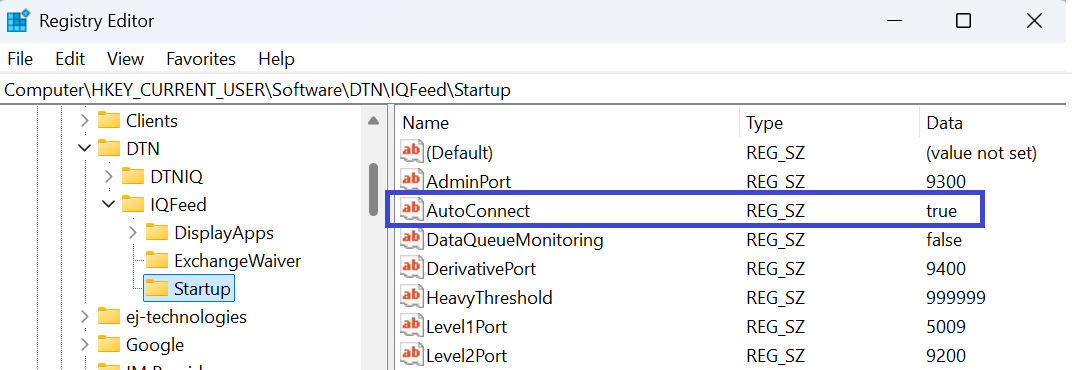
Deselecting IQFeed client's Auto-Connect is a real challenge. The next time I do it, I'll have to write a procedure, but I think I had to change a registry key.
Deselecting IQFeed client's Auto-Connect is a real challenge. The next time I do it, I'll have to write a procedure, but I think I had to change a registry key.
Here's the spot if you're comfortable with doing that sort of thing-
QUOTE:
Probably it's still hitting IQFeed for historical data because you didn't uncheck it ...
That was the first thing I tried, but it didn't help.
QUOTE:
Deselecting IQFeed client's Auto-Connect is a real challenge. The next time I do it, I'll have to write a procedure, but I think I had to change a registry key.
So unchecking the "Automatically Connect" box doesn't automatically update the registry setting? That sounds like a bug for DTN to fix.
I did read Post #6, and that registry patch is good to know. But I think I'll just wait until DTN gets their connectivity corrected. Thanks for the help!
Your Response
Post
Edit Post
Login is required