Where can I find a detailed description of the format of the saved optimization file?
Rename
I don't think there is an optimization file. What's the file name and where is it located? Are you talking about the *.XML file for the strategy?
You can open the Preferred Values tab for the strategy and save those values to the Windows Clipboard. Is that what you're trying to do?
You can open the Preferred Values tab for the strategy and save those values to the Windows Clipboard. Is that what you're trying to do?
superticker
When you save an optimization file WL uses a format that I cannot find described in the documentation. I would like to read and process that file post-run. I can figure out most of it except the header. And that portion is the key.
When you save an optimization file WL uses a format that I cannot find described in the documentation. I would like to read and process that file post-run. I can figure out most of it except the header. And that portion is the key.
QUOTE:
When you save an optimization file WL uses a format that I cannot find described in the documentation.
And what's the name of this file? Where is it located? Is this a file from a finantic optimizer, which wasn't developed by the WealthLab team?
What information is in this file that's of interest? The only thing I find interesting about the optimizations are the Preferred Value numbers, and they are made available as I discussed in Post #1. I don't think anything else from the optimization is immediately useful, but prove me wrong.
superticker
This is a WL8 standard feature. The saved file can be found in C:\Users\***********\AppData\Roaming\WealthLab8\SavedOptimizations
and is named something like this
StandardRun_7-4-2026_09-29.WL8Opt
Vince
This is a WL8 standard feature. The saved file can be found in C:\Users\***********\AppData\Roaming\WealthLab8\SavedOptimizations
and is named something like this
StandardRun_7-4-2026_09-29.WL8Opt
Vince
Okay, I found that file and I'm looking at it. It looks like it simply contains the Symbol Rankings by ScoreCard metrics for the last strategy you optimized. I assume that's what you're looking for ... correct? (You really never told us even though I asked twice.)
You can find that information from the Strategy Ranking tool. Open that tool up, select the Symbol Rankings tab and the relevant strategy, and then the tool will fill in the table below. You can then copy that table to the Windows Clipboard. You're done.
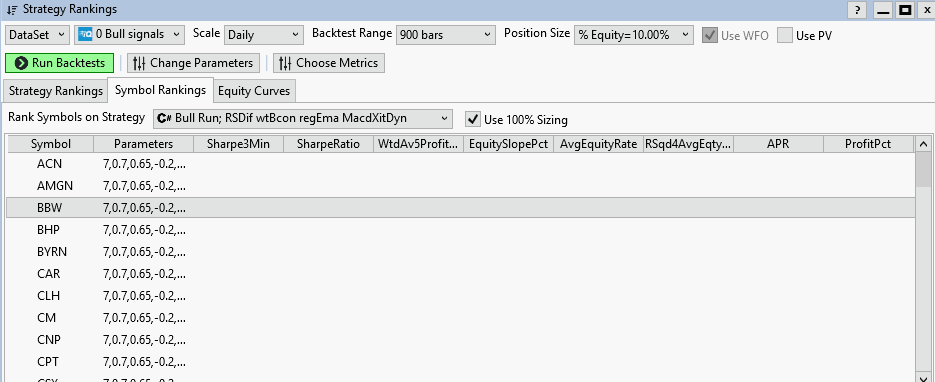
Just in case you're curious, I've though about import this exact data into a stat package for a cluster analysis. It's on my list of things to do, so we both think alike.
You can find that information from the Strategy Ranking tool. Open that tool up, select the Symbol Rankings tab and the relevant strategy, and then the tool will fill in the table below. You can then copy that table to the Windows Clipboard. You're done.
Just in case you're curious, I've though about import this exact data into a stat package for a cluster analysis. It's on my list of things to do, so we both think alike.
I am aware that I can view the results in WL, but I want to process the data externally which requires reading the .WL8Opt file directly.
Then make a feature request to save the *..WL8Opt file in question in Parquet format (Apache Parquet file format) so your stat package can read it directly without going through the Windows Clipboard. So that's what this is really about.
I am probably the only person who needs to access this data and I don't see a good reason to ask Glitch to code up something just for me when all he would have to do is provide the detailed file structure.
Vince
Vince
Crew
Is there any possibility of getting an answer to this request? Thanks!
Vince
Is there any possibility of getting an answer to this request? Thanks!
Vince
Hey Vince,
The saved optimization files use our internal tokenizer format which is quite complicated to explain. So we currently cannot support providing the format of the files. We'll consider simplifying and documenting the format in a future release.
The saved optimization files use our internal tokenizer format which is quite complicated to explain. So we currently cannot support providing the format of the files. We'll consider simplifying and documenting the format in a future release.
Thanks Glitch for your response. I will be waiting. :)
Vince
Vince
QUOTE:
We'll consider simplifying and documenting the format in a future release.
I would simply save it in Parquet format so all third-party software (like R or MatLab) can read it directly and everything will be automatically documented accordingly. See Post #7.
Your Response
Post
Edit Post
Login is required