Hello. I am completely new to WealthLab. I purchased a one-year license to test it out; I have been using AmiBroker for many years.
I want to create a C# WinForms application in Visual Studio that accesses WealthLab directly. Ideally, everything would run within my own WinForms application without using the WealthLab user interface.
I have tried various approaches but haven't quite managed to get it working.
What options are available to achieve this? Is it even possible? Or am I limited to using custom DLLs within the WealthLab interface? WealthLab is installed and licensed on my development machine.
I want to create a C# WinForms application in Visual Studio that accesses WealthLab directly. Ideally, everything would run within my own WinForms application without using the WealthLab user interface.
I have tried various approaches but haven't quite managed to get it working.
What options are available to achieve this? Is it even possible? Or am I limited to using custom DLLs within the WealthLab interface? WealthLab is installed and licensed on my development machine.
Rename
I suggest telling us the basic functionality you want to achieve with your WinForms application. For your purposes, there may be a simpler approach that utilizes Wealth Lab user interface.
That is relatively easy to describe. I want full access to all the functionalities of the WealthLab .NET API via a C# WinForm application. Everything should run within my own WinForm interface—without launching WealthLab itself or operating within the WealthLab GUI.
In other words... developing trading systems, optimization, backtesting, importing external data into a native WealthLab database from various sources (such as real-time data from SQL Server combined with Norgate "Current and Past" EOD data), and much more. I’ve reviewed the API documentation, and as far as I can tell, it covers all the necessary capabilities.
I’ve been doing exactly this with AmiBroker for many years and have been actively trading using that setup for a long time. I realize that WealthLab will be slower than AmiBroker when it comes to optimization. Nevertheless, executing everything consistently in C# within a WinForm application would suit my trading setup better. Furthermore, WealthLab’s functionality seems superior to AmiBroker’s in certain areas.
I initially assumed it would work this way, but I couldn't find a solution during my initial tests.
In other words... developing trading systems, optimization, backtesting, importing external data into a native WealthLab database from various sources (such as real-time data from SQL Server combined with Norgate "Current and Past" EOD data), and much more. I’ve reviewed the API documentation, and as far as I can tell, it covers all the necessary capabilities.
I’ve been doing exactly this with AmiBroker for many years and have been actively trading using that setup for a long time. I realize that WealthLab will be slower than AmiBroker when it comes to optimization. Nevertheless, executing everything consistently in C# within a WinForm application would suit my trading setup better. Furthermore, WealthLab’s functionality seems superior to AmiBroker’s in certain areas.
I initially assumed it would work this way, but I couldn't find a solution during my initial tests.
I would consider using WPF instead of WinForms, albeit you may have significant reasons for using WinForms, perhaps your own libraries.
You mentioned you tried various approaches, but haven't quite managed to get it working. What are some of the issues you are encountering?
You mentioned you tried various approaches, but haven't quite managed to get it working. What are some of the issues you are encountering?
You could leverage the REST API. It was built with AI in mind it it might deliver just what you need. It doesn’t yet expose everything. but you can run backtests and get complete results. Look up REST in the WL help.
@paul1986
Sure... using WPF would be perfectly feasible. My planned developments—such as real-time data retrieval, advanced automation, and much more—could easily be implemented. That said, even with WPF and C#, it likely wouldn't be possible to create a fully standalone solution (running on the same machine where WL is installed and licensed).
@Glitch
A REST API would work; I’ve tested it extensively. However... I find that approach extremely labor-intensive. Plus, I’m concerned that using HTTPS might result in significant speed penalties, as it introduces an extra layer of processing.
I think the official approach—using a C# DLL developed in Visual Studio—would likely be the fastest method. I might be able to launch WL from my own C# program and then execute that DLL within it.
On a personal note: I’m a complete newcomer to WL. The fact that I’m getting such helpful, relevant answers here speaks volumes about WL. Many thanks for that.
Sure... using WPF would be perfectly feasible. My planned developments—such as real-time data retrieval, advanced automation, and much more—could easily be implemented. That said, even with WPF and C#, it likely wouldn't be possible to create a fully standalone solution (running on the same machine where WL is installed and licensed).
@Glitch
A REST API would work; I’ve tested it extensively. However... I find that approach extremely labor-intensive. Plus, I’m concerned that using HTTPS might result in significant speed penalties, as it introduces an extra layer of processing.
I think the official approach—using a C# DLL developed in Visual Studio—would likely be the fastest method. I might be able to launch WL from my own C# program and then execute that DLL within it.
On a personal note: I’m a complete newcomer to WL. The fact that I’m getting such helpful, relevant answers here speaks volumes about WL. Many thanks for that.
It seems you have a trading process for which portions of it are satisfied by Wealth-Lab. I'll presume the various approaches you have already tried did not work for your requirements.
I suggest you create a DLL that is for a WealthLabClientExtension. This should allow you to have your functionality run within a Wealth-Lab instance. The WeatlhLabClientExtension documentation is here: https://www.wealth-lab.com/Support/ExtensionApi/WealthLabClientExtension
By using a WealthLabClientExtension (client extension), you can create however many System.Windows.Window instances as you require for your functionality. The System.Windows.Window instances can be placed outside of the WL main window which I presume is desirable for your requirements.
A client extension has a menu item that appears in the WealthLab Extensions menu. The client extension is launched when you pick the extension's menu item. If you need your window(s) to be present when WealthLab is run then you can launch your extension and save the default workspace (you only need to do that one time). The next time you run WealthLab then your extension will launch.
Side note: you do not have to create a ChildWindow for the WealthLabClientExtension. You'll see how ChildWindow plays into the WealthLabClientExtension scheme once you're familiar with the WealthLabClientExtension. I recommend you create the ChildWindow even if your functionality does not use it, because WL workspaces may utilize/need it to operate properly. You could make the ChildWindow tiny and stash it away in a corner. Also, you don't have to create client extension help.
And by all means, use WPF and not WinForms. It may be challenging to use WinForms if that is even possible in the above scenario. WealthLab uses WPF.
Also, you mentioned that you want to import external data into the WealthLab database. If an existing extension does not meet your requirements then consider writing your own HistoricalDataProvider and/or EventDataProvider and/or StreamingDataProvider (see the API reference).
I suggest you create a DLL that is for a WealthLabClientExtension. This should allow you to have your functionality run within a Wealth-Lab instance. The WeatlhLabClientExtension documentation is here: https://www.wealth-lab.com/Support/ExtensionApi/WealthLabClientExtension
By using a WealthLabClientExtension (client extension), you can create however many System.Windows.Window instances as you require for your functionality. The System.Windows.Window instances can be placed outside of the WL main window which I presume is desirable for your requirements.
A client extension has a menu item that appears in the WealthLab Extensions menu. The client extension is launched when you pick the extension's menu item. If you need your window(s) to be present when WealthLab is run then you can launch your extension and save the default workspace (you only need to do that one time). The next time you run WealthLab then your extension will launch.
Side note: you do not have to create a ChildWindow for the WealthLabClientExtension. You'll see how ChildWindow plays into the WealthLabClientExtension scheme once you're familiar with the WealthLabClientExtension. I recommend you create the ChildWindow even if your functionality does not use it, because WL workspaces may utilize/need it to operate properly. You could make the ChildWindow tiny and stash it away in a corner. Also, you don't have to create client extension help.
And by all means, use WPF and not WinForms. It may be challenging to use WinForms if that is even possible in the above scenario. WealthLab uses WPF.
Also, you mentioned that you want to import external data into the WealthLab database. If an existing extension does not meet your requirements then consider writing your own HistoricalDataProvider and/or EventDataProvider and/or StreamingDataProvider (see the API reference).
@paul1986
That’s correct. So far, I’ve essentially been using three components: 1. Data acquisition, 2. Signal processing and automation, and 3. Backtesting. Steps 1 and 2 are handled by a C# application, while step 3 runs in AmiBroker. Interaction with AmiBroker takes place primarily via CSV files using COM; this works quite well, though it can be somewhat unstable at times.
I had been looking for a way to consolidate everything under "one roof," and Visual Studio (with C# or C++) was the obvious choice for that. That’s how I came across WealthLab. I would still perform optimizations in AmiBroker, but WealthLab seems well-suited for execution and live trading.
Regarding your suggested solution: I ran some preliminary tests yesterday, and it looks like everything I want to do is possible. I’m not very familiar with WPF—I’ve been using WinForms for a long time—but that shouldn't be a problem.
So, thank you very much for the tip.
That’s correct. So far, I’ve essentially been using three components: 1. Data acquisition, 2. Signal processing and automation, and 3. Backtesting. Steps 1 and 2 are handled by a C# application, while step 3 runs in AmiBroker. Interaction with AmiBroker takes place primarily via CSV files using COM; this works quite well, though it can be somewhat unstable at times.
I had been looking for a way to consolidate everything under "one roof," and Visual Studio (with C# or C++) was the obvious choice for that. That’s how I came across WealthLab. I would still perform optimizations in AmiBroker, but WealthLab seems well-suited for execution and live trading.
Regarding your suggested solution: I ran some preliminary tests yesterday, and it looks like everything I want to do is possible. I’m not very familiar with WPF—I’ve been using WinForms for a long time—but that shouldn't be a problem.
So, thank you very much for the tip.
@jerdchen
Below is a bare-bones template for a client extension that is a bit more filled-out than the example shown in the Wealth-Lab reference. The code creates a singleton extension window. Read the comments for details.
See the end of method GetCreateExtensionWindow where OtherWindow is created (its commented-out). Of course, your code will be responsible for window lifecycle management should you choose to use one or more System.Windows.Window instances.
Note that you would still create the ChildWindow (class ExtensionWindow in the code below) because WL expects it. You don't have to actually use it, but can instead use your instance(s) of System.Windows.Window. I suppose, given the bit I infer from your requirements, you want to create at least one System.Windows.Window and use it instead of the extension window, because the System.Windows.Window is not physically constrained to the boundaries of the WealthLab window.
Also, I use GitHub Copilot inside of JetBrains Rider (an IDE like Visual Studio) and the productivity gains for me are huge. So, if you're not already familiar with GitHub Copilot for Visual Studio, it is integrated into Visual Studio if you install the .NET desktop development workload. The basic GitHub Copilot subscription is, I believe, $10/month. It allows you to use many LLMs such as Claude, ChatGpt, Gemini, etc. Also, since you indicated you are not familiar with WPF then its a great way to help learn WPF and generate code for it.
Also, do yourself a big favor and "bite the bullet" and learn/use WPF. WinForms is a dinosaur in comparison. I suggest asking your favorite AI to show you the advantages. And, as I mentioned previously, WealthLab uses WPF, so you don't want to fight that.
Below is a bare-bones template for a client extension that is a bit more filled-out than the example shown in the Wealth-Lab reference. The code creates a singleton extension window. Read the comments for details.
See the end of method GetCreateExtensionWindow where OtherWindow is created (its commented-out). Of course, your code will be responsible for window lifecycle management should you choose to use one or more System.Windows.Window instances.
Also, I use GitHub Copilot inside of JetBrains Rider (an IDE like Visual Studio) and the productivity gains for me are huge. So, if you're not already familiar with GitHub Copilot for Visual Studio, it is integrated into Visual Studio if you install the .NET desktop development workload. The basic GitHub Copilot subscription is, I believe, $10/month. It allows you to use many LLMs such as Claude, ChatGpt, Gemini, etc. Also, since you indicated you are not familiar with WPF then its a great way to help learn WPF and generate code for it.
Also, do yourself a big favor and "bite the bullet" and learn/use WPF. WinForms is a dinosaur in comparison. I suggest asking your favorite AI to show you the advantages. And, as I mentioned previously, WealthLab uses WPF, so you don't want to fight that.
CODE:
using System.Collections.Generic;
using System.Threading;
using System.Windows;
using System.Windows.Controls;
using WealthLab.WPF;

// The following code requires at least C# version 13.

namespace WLExtensions;

/// <summary>
///     Minimal, bare-bones WL9 (8) client extension used as a starting point ("template") for building
///     new Wealth-Lab 9 (8) client extensions. It registers a single menu item under the extension's menu
///     and shows a singleton child window (<see cref="ExtensionWindow" />) when activated.
///     Copy/rename this class (and its companion window class) as the basis for a new extension.
/// </summary>
public sealed class ClientExtensionTemplate : WL8ClientExtensionBase
{
    // name of the extension as shown in WL9; adjust for your extension's name
    private const string ExtensionName = "Extension Template";

    // The resource path of the glyph/icon shown next to the extension's menu item and on its
    // child window title bar. Re-using an existing embedded resource avoids having to add a
    // new image asset just for this extension.
    // Here, the candlestick glyph from the WealthLab.Candlesticks.WPF assembly is used,
    // but you can add your own image to your extension project and reference it here instead.
    public const string ImageSourceName = "WealthLab.Candlesticks.WPF.Glyphs.Candlesticks.png";

    // Display name for the extension as shown in the WL9 client's Extensions list/UI.
    public override string Name => ExtensionName;

    /// <summary>
    ///     Builds the list of menu items WL9 should display for this extension (e.g., under the
    ///     Extensions menu). Called by the host application when it needs to populate the menu.
    /// </summary>
    /// <returns>A list containing the single menu item that opens/activates the extension window.</returns>
    public override List<MenuItem> GetMenuItems()
    {
        var mi = new List<MenuItem>();

        // CreateExtensionMenuItem (inherited from WL8ClientExtensionBase) builds a properly
        // styled MenuItem with the given caption and glyph. The click handler opens (or brings
        // to the front) the singleton extension window rather than creating a new one each time.
        var mni = CreateExtensionMenuItem("Extension Template",
            GlyphManager.GetImageSource(ImageSourceName, this),
            (_, _) => { ExtensionWindow.GetCreateExtensionWindow(); });

        mi.Add(mni);
        return mi;
    }

    /// <summary>
    ///     Returns the child window associated with this extension. WL9 calls this (e.g., when
    ///     restoring a saved workspace/layout) with a token identifying which window to recreate.
    ///     Since this template only has one window, the token is ignored and the singleton
    ///     <see cref="ExtensionWindow" /> instance is always returned/created.
    /// </summary>
    /// <param name="token">
    ///     Identifier of the requested child window (unused here since there is only one for this sample
    ///     template).
    /// </param>
    public override ChildWindow GetChildWindow(string token) => ExtensionWindow.GetCreateExtensionWindow();
}

/// <summary>
///     The single child window ("panel") shown by <see cref="ClientExtensionTemplate" />. Implemented as
///     a lazily created singleton so that activating the extension's menu item repeatedly reuses the
///     same window instance instead of spawning duplicates. Replace <see cref="BuildContent" /> with
///     real UI construction when adapting this template for an actual extension.
/// </summary>
public sealed class ExtensionWindow : ChildWindow
{
    // title shown on the window's title bar; adjust for your extension's window title
    private const string ExtensionTitle = "Extension Template";

    // Synchronizes creation/teardown of the singleton MyWindow instance across threads.
    private static readonly Lock WindowLock = new();

    // Private constructor forces all instantiation through GetCreateExtensionWindow(),
    // guaranteeing the singleton pattern is respected.
    private ExtensionWindow()
    {
        BuildContent();
    }

    // Root layout panel that holds the window's UI content.
    private Grid MyContent { get; set; }

    // Backing field for the single live instance of this window; null when no window is open.
    private static ExtensionWindow ExtensionChildWindow { get; set; }

    /// <summary>
    ///     Constructs the window's visual content. This template just creates an empty <see cref="Grid" />
    ///     anchored to the top of the window with a small margin; real extensions should add controls
    ///     to <see cref="MyContent" /> here (or build a more elaborate layout).
    ///     If your extension doesn't want to use the extension child window then you can
    ///     simply not add anything to Content.
    /// </summary>
    private void BuildContent()
    {
        // example: make a grid...
        MyContent = new Grid
        {
            VerticalAlignment = VerticalAlignment.Top,
            Margin = new Thickness(10)
        };

        // add a couple of rows and columns to the grid as an example; real extensions would add more controls here
        var rowDef = new RowDefinition {Height = new GridLength(1, GridUnitType.Star)};
        MyContent.RowDefinitions.Add(rowDef);
        var colDef = new ColumnDefinition {Width = new GridLength(1, GridUnitType.Star)};
        MyContent.ColumnDefinitions.Add(colDef);
        Content = MyContent;
    }

    /// <summary>
    ///     Returns the existing extension window if one is already open, otherwise creates it,
    ///     and wires up cleanup so the singleton reference is cleared when the window is closed.
    ///     Thread-safe via <see cref="WindowLock" />.
    ///     Also, you can create other resources like System.Windows.Window, etc. here if you want to have a more complex
    ///     extension with multiple windows.
    /// </summary>
    /// <returns>The singleton <see cref="ExtensionWindow" /> instance, creating it on the first call.</returns>
    public static ExtensionWindow GetCreateExtensionWindow()
    {
        lock (WindowLock)
        {
            // Reuse the existing window if it's already open rather than creating a second one.
            if (ExtensionChildWindow != null)
            {
                return ExtensionChildWindow;
            }

            var window = new ExtensionWindow();

            // Ask the WL9 client host to display this window as an MDI child, with the given
            // title and glyph icon (matching the icon used on the extension's menu item).
            WLClientHost.Instance.ShowExtensionChildWindow(window, ExtensionTitle,
                GlyphManager.GetImageSource(ClientExtensionTemplate.ImageSourceName));

            // NaN width/height tells the MDI host to auto-size the window to its content
            // rather than using a fixed size.
            window.MyMDIChild.Width = double.NaN;
            window.MyMDIChild.Height = double.NaN;

            // When the user closes the window, clear the singleton reference so the next
            // menu click creates a fresh window instead of reusing a disposed one.
            window.MyMDIChild.Closing += (_, _) =>
            {
                lock (WindowLock)
                {
                    ExtensionChildWindow = null;
                }
            };
            ExtensionChildWindow = window;

            // you could also create other windows here if you want to have a more complex extension with multiple windows,
            // like create a System.Windows.Window...
            // OtherWindow = new Window(); // presume OtherWindow is a static property of type Window
        }

        return ExtensionChildWindow;
    }
}
I don't think there's really any need to create a ChildWindow if you don't need one.
QUOTE:
I don't think there's really any need to create a ChildWindow if you don't need one.
I just tried another test, and you're right. I must have overlooked something the first time I tried it with one of my existing extensions.
I explored this a bit further today. I created a DLL containing a WPF window. I can design it however I like in Visual Studio—it can even include tabs and the like. The possibilities are virtually limitless. And this window makes it possible to control absolutely everything—every single detail—in a custom way. The window is simply launched via an entry in the Extensions menu. So, I decided against using the WL `ChildWindow` class. It seems to be working well.
Thanks again to @Paul1986. That was a really good tip; it helped me a lot.
Thanks again to @Paul1986. That was a really good tip; it helped me a lot.
@Glitch
@Paul1986
As I mentioned above, I created a DLL with a WPF window. @Paul1986 had recommended that approach. However, I would prefer to use a WinForms window.
Is there any reason not to use a WinForms window? This window would only be needed to trigger actions—such as backtesting, optimization, and much more. The window does not run within the context of the WL GUI.
@Paul1986
As I mentioned above, I created a DLL with a WPF window. @Paul1986 had recommended that approach. However, I would prefer to use a WinForms window.
Is there any reason not to use a WinForms window? This window would only be needed to trigger actions—such as backtesting, optimization, and much more. The window does not run within the context of the WL GUI.
There’s no reason not to. WL already “uses” Winforms for some things not available in WPF such as multi monitor support.
The only reason to go WPF would be if you want a ChildWindow that operates inside the main WL container.
Keep us posted how it goes!
The only reason to go WPF would be if you want a ChildWindow that operates inside the main WL container.
Keep us posted how it goes!
@Glitch
No... that doesn't work. After all, I need to create at least one `MenuItem` to launch the window.
`GetMenuItems()` references `WL8ClientExtensionBase`.
And as I understand it, that requires WPF.
A WPF window works fine for me, though; it’s just that I’m much more familiar with WinForms, having used them exclusively until now.
As WPF Window ( without ChildWindow ) it works fine.
No... that doesn't work. After all, I need to create at least one `MenuItem` to launch the window.
`GetMenuItems()` references `WL8ClientExtensionBase`.
And as I understand it, that requires WPF.
A WPF window works fine for me, though; it’s just that I’m much more familiar with WinForms, having used them exclusively until now.
As WPF Window ( without ChildWindow ) it works fine.
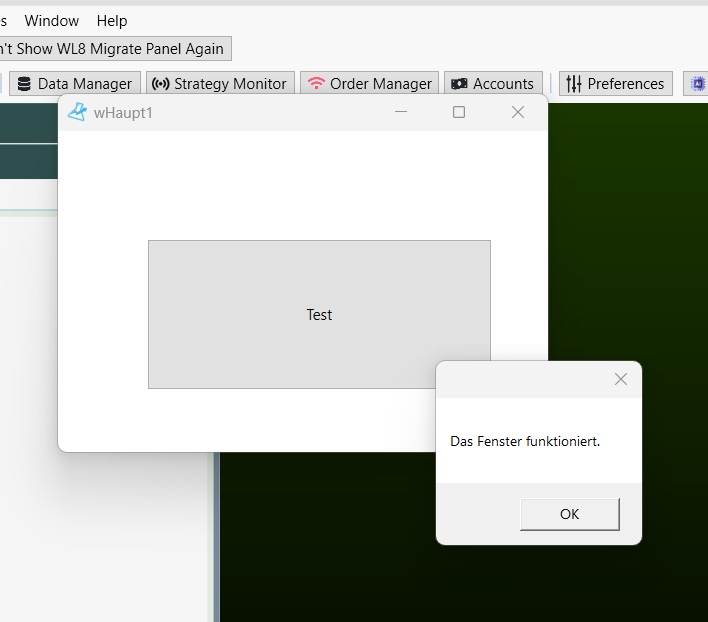
QUOTE:
No... that doesn't work. After all, I need to create at least one `MenuItem` to launch the window.
`GetMenuItems()` references `WL8ClientExtensionBase`.
And as I understand it, that requires WPF.
Yes, you need to create the menu item so as to be able to launch the window and code that functionality as demonstrated in the online WealthLab reference or the example I gave in Post #8.
But, your extension's code should be able to also create an instance of your WinForms Form. and then Show() it. I didn't try it, but it should work. If there is a UI thread issue then insure you wrap a Dispatcher.Invoke call around the WinForms creation and showing of it...
CODE:
    Application.Current.Dispatcher.Invoke(() =>
    {
        var form = new MyWinFormsWindow(); // or store the form in an property
        form.Show();
    });
You said "that doesn't work", but what were the problem(s)?
Thanks for the hint, paul1986. I got it working in the meantime, so here is the solution for anyone who wants a WinForms window instead of WPF:
1. In the .csproj, enable both:
`<UseWindowsForms>true</UseWindowsForms>`
`<UseWPF>true</UseWPF>`
(WPF is still needed because `WL8ClientExtensionBase` requires a WPF `MenuItem`.)
2. The menu item stays WPF, the click handler simply opens the WinForms form:
`WindowsFormsHost.EnableWindowsFormsInterop()` (namespace `System.Windows.Forms.Integration`) makes keyboard input work correctly in a modeless WinForms form opened from WPF.
Regarding `Dispatcher.Invoke`: it isn't needed here, because the menu click already runs on the UI thread. It only becomes necessary when a background thread (e.g. a backtest started with `Task.Run`) needs to update the form.
Thanks again to everyone for the help!
1. In the .csproj, enable both:
`<UseWindowsForms>true</UseWindowsForms>`
`<UseWPF>true</UseWPF>`
(WPF is still needed because `WL8ClientExtensionBase` requires a WPF `MenuItem`.)
2. The menu item stays WPF, the click handler simply opens the WinForms form:
CODE:

    public class WLAppMenu : WL8ClientExtensionBase
    {
        private static wlMainWindow? mainWindow;

        public override string Name => "WLAppForm";

        public override List<System.Windows.Controls.MenuItem> GetMenuItems()
        {
            var menuItem = new System.Windows.Controls.MenuItem { Header = "WLAppForm öffnen" };
            menuItem.Click += MenuItem_Click;
            return new List<System.Windows.Controls.MenuItem> { menuItem };
        }

        private void MenuItem_Click(object sender, RoutedEventArgs e)
        {
            if (mainWindow == null || mainWindow.IsDisposed)
            {
                WindowsFormsHost.EnableWindowsFormsInterop();
                mainWindow = new wlMainWindow();
                mainWindow.Show();
            }
            else
                mainWindow.Activate();
        }
    }
`WindowsFormsHost.EnableWindowsFormsInterop()` (namespace `System.Windows.Forms.Integration`) makes keyboard input work correctly in a modeless WinForms form opened from WPF.
Regarding `Dispatcher.Invoke`: it isn't needed here, because the menu click already runs on the UI thread. It only becomes necessary when a background thread (e.g. a backtest started with `Task.Run`) needs to update the form.
Thanks again to everyone for the help!
Glad you got it working, it brings back fond memories of all of the WinForms development I've done over the years :)
Well, then, a green first-year apprentice in WealthLab was at least able to bring a little joy to the WealthLab master. :-)
Your Response
Post
Edit Post
Login is required