I've been running Glitch's 1%/week v3 strategy on a few symbols. It works on the first day of the week and places buy/sell orders correctly. But, it seems like this strategy and other strategies aren't appropriately cancelling/replacing orders on the second day of the week. I'm getting these errors..
9/6/2023 08:30:41:833
Alpaca
Error Replacing order: One or more errors occurred. (order not found)
AggregateException
One or more errors occurred. (order not found) Inner Exception: order not found
at System.Threading.Tasks.Task.ThrowIfExceptional(Boolean includeTaskCanceledExceptions)
at System.Threading.Tasks.Task`1.GetResultCore(Boolean waitCompletionNotification)
at WealthLab.Alpaca.AlpacaBroker.ReplaceTrade(Transaction oldOrder, Transaction newOrder)
--------
9/6/2023 08:30:51:950
Alpaca
Error canceling order: One or more errors occurred. (order not found)
AggregateException
One or more errors occurred. (order not found) Inner Exception: order not found
at WealthLab.Alpaca.AlpacaBroker.CancelTrade(Transaction t)
--------
9/6/2023 08:31:31:092
Alpaca
Error Replacing order: One or more errors occurred. (order not found)
AggregateException
One or more errors occurred. (order not found) Inner Exception: order not found
at System.Threading.Tasks.Task.ThrowIfExceptional(Boolean includeTaskCanceledExceptions)
at System.Threading.Tasks.Task`1.GetResultCore(Boolean waitCompletionNotification)
at WealthLab.Alpaca.AlpacaBroker.ReplaceTrade(Transaction oldOrder, Transaction newOrder)
--------
When I go on Alpaca's website, there weren't any buy orders put in for TQQQ today despite it not entering into a position yesterday.
9/6/2023 08:30:41:833
Alpaca
Error Replacing order: One or more errors occurred. (order not found)
AggregateException
One or more errors occurred. (order not found) Inner Exception: order not found
at System.Threading.Tasks.Task.ThrowIfExceptional(Boolean includeTaskCanceledExceptions)
at System.Threading.Tasks.Task`1.GetResultCore(Boolean waitCompletionNotification)
at WealthLab.Alpaca.AlpacaBroker.ReplaceTrade(Transaction oldOrder, Transaction newOrder)
--------
9/6/2023 08:30:51:950
Alpaca
Error canceling order: One or more errors occurred. (order not found)
AggregateException
One or more errors occurred. (order not found) Inner Exception: order not found
at WealthLab.Alpaca.AlpacaBroker.CancelTrade(Transaction t)
--------
9/6/2023 08:31:31:092
Alpaca
Error Replacing order: One or more errors occurred. (order not found)
AggregateException
One or more errors occurred. (order not found) Inner Exception: order not found
at System.Threading.Tasks.Task.ThrowIfExceptional(Boolean includeTaskCanceledExceptions)
at System.Threading.Tasks.Task`1.GetResultCore(Boolean waitCompletionNotification)
at WealthLab.Alpaca.AlpacaBroker.ReplaceTrade(Transaction oldOrder, Transaction newOrder)
--------
When I go on Alpaca's website, there weren't any buy orders put in for TQQQ today despite it not entering into a position yesterday.
Rename
I've been placing these automatic orders with an Alpaca Paper account for weeks. This works fine.

There must be a difference we haven't uncovered with live accounts.
What's this "Replacing order" thing all about. What are you doing to get that? The strategy does not replace orders.
Walk me through your setup. Give us a picture of it.
There must be a difference we haven't uncovered with live accounts.
What's this "Replacing order" thing all about. What are you doing to get that? The strategy does not replace orders.
Walk me through your setup. Give us a picture of it.
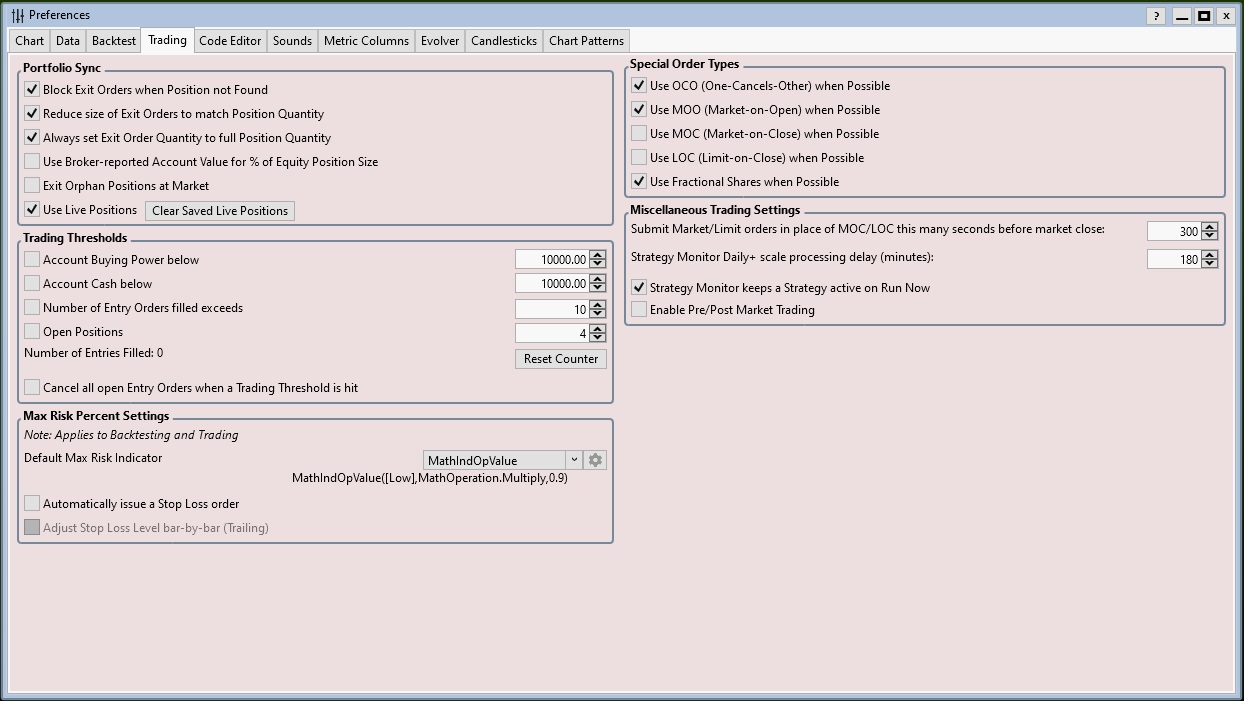
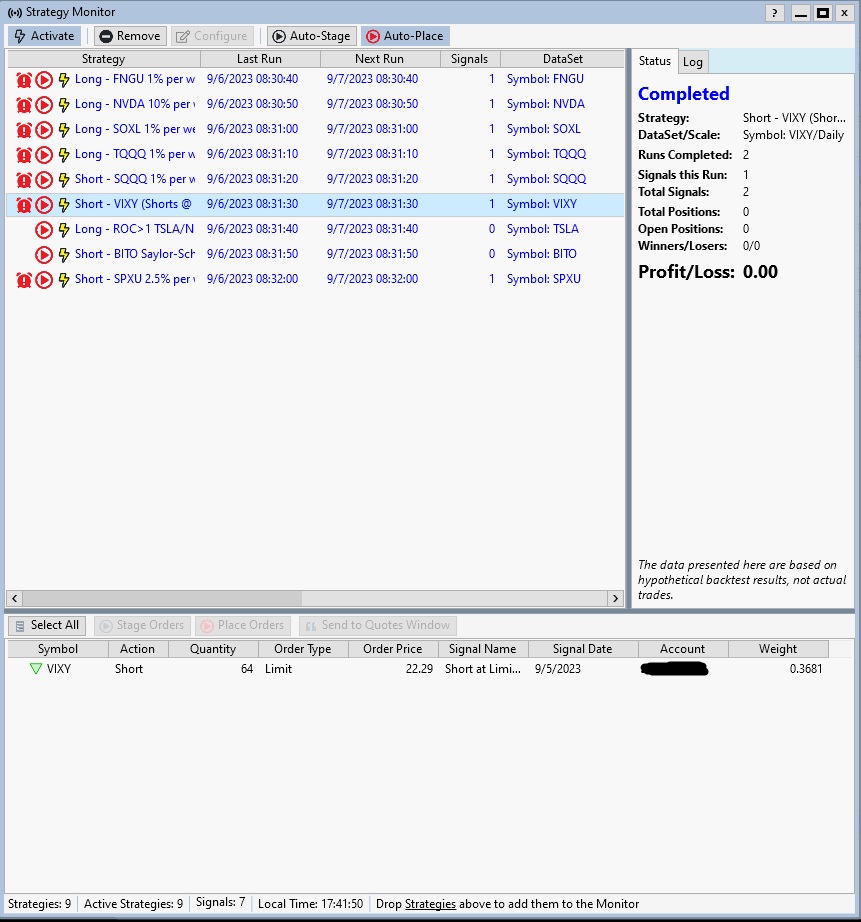
My strategy monitor has never populated anything on the right pane where it has fields for "Total Positions" "Open Positions" "Winners/Losers 0/0" and "Profit/Loss: 0.00". None of those fields have ever read anything other than zero, even when the strategy enters into a trade.
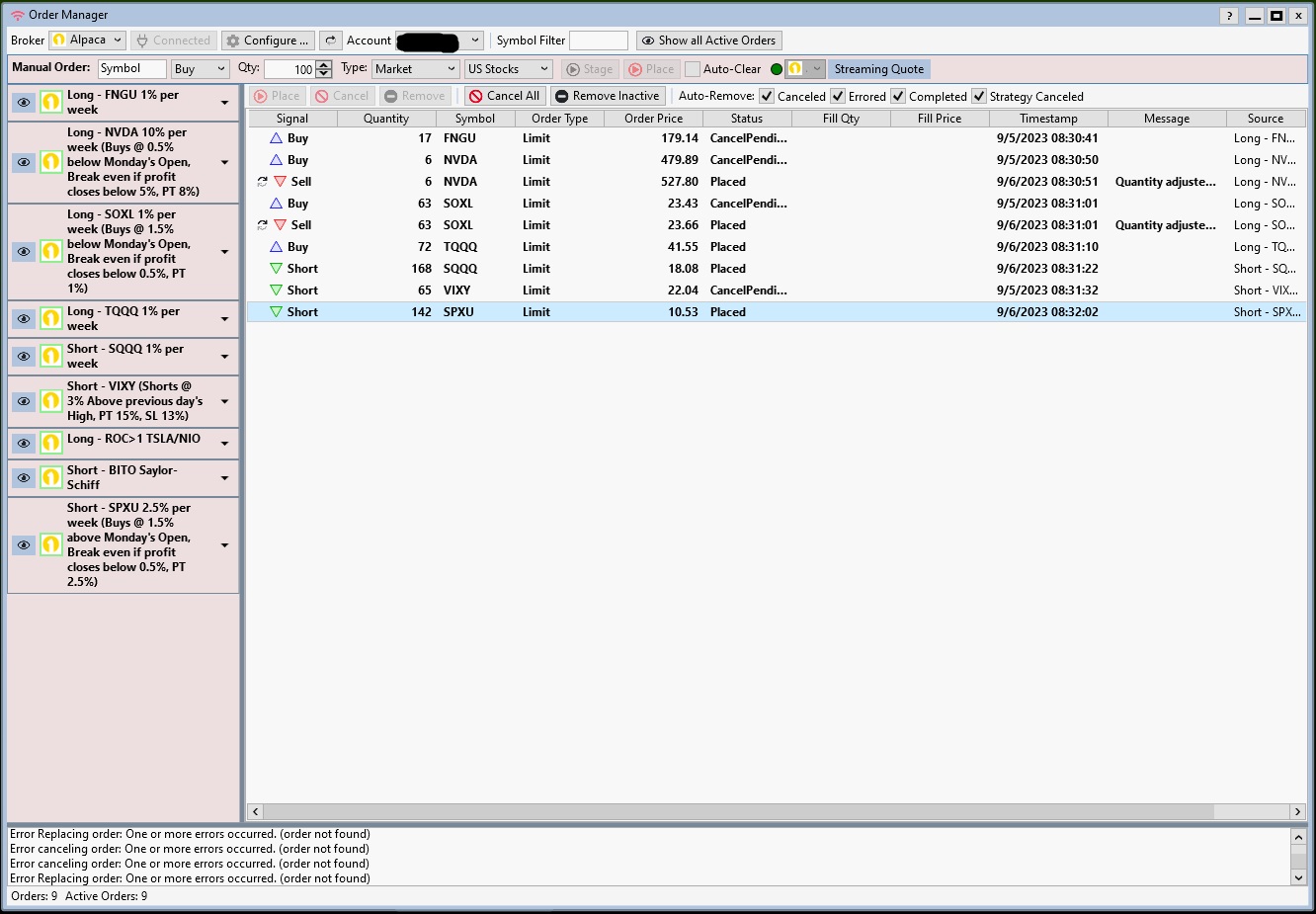
The strategy for SOXL successfully closed today. So, it somehow recognized it had opened a position yesterday and sent the appropriate sell order. The strategy orders for FNGU, TQQQ, SQQQ, and VIXY didn't successfully get to Alpaca. They should have all sent buy (FNGU, TQQQ) and sell (SQQQ, VIXY) orders today. Oddly enough, the strategy for SPXU did send a sell order and was filled successfully.
To answer your question, I have no idea what I'm doing to get the "Replace Orders" error.
QUOTE:Let's see if we can get Glitch to comment on that. I've never looked at that for anything but intraday trading, so it might have something to do with the date that the item was activated.
My strategy monitor has never populated anything on the right pane where it has fields for "Total Positions" "Open Positions" "Winners/Losers 0/0" and "Profit/Loss: 0.00".
QUOTE:One reason is because you're using the Live Positions preference. This ensures that strategies that run in the Strategy Monitor (and Streaming charts) are aware of the positions in the account. WealthLab syncs the strategy to those positions.
The strategy for SOXL successfully closed today. So, it somehow recognized it had opened a position yesterday and sent the appropriate sell order.
QUOTE:The Order Manager is showing orders from yesterday in a CancelPending status. That's already not good. Then there are orders from today with a "Placed" status. That's not good either. This indicates to me that we're missing messaging from Alpaca, which could be a bad broker connection.
To answer your question, I have no idea what I'm doing to get the "Replace Orders" error.
Suggestions:
1. Use the latest Alpaca build if you don't already have it. It gets the orders that are already active when connecting to Alpaca and displays them in the Order Manager.
2. Restart WealthLab each day before the market open. Broker connections need to be refreshed every day. If you're going for Automation, schedule it in the Windows Task Scheduler.
1. I have the latest Alpaca build. I had to send in the orders manually on Alpaca’s website yesterday since several of the WL automations didn’t work.
2. I restarted it this morning and the orders that I put in manually on Alpaca’s website do not appear in Order Manager. There aren’t any orders in Order Manager at this point. The list of open positions do appear in the Accounts window though. But, I clicked on Enable Pre/Post Market Trading in Preferences, then ran the 1%/weekv3 on TQQQ and it didn’t get a signal and never sent in a breakeven order for the current open position.
2. I restarted it this morning and the orders that I put in manually on Alpaca’s website do not appear in Order Manager. There aren’t any orders in Order Manager at this point. The list of open positions do appear in the Accounts window though. But, I clicked on Enable Pre/Post Market Trading in Preferences, then ran the 1%/weekv3 on TQQQ and it didn’t get a signal and never sent in a breakeven order for the current open position.
1. I have the latest Alpaca build. I had to send in the orders manually on Alpaca’s website yesterday since several of the WL automations didn’t work.
When did you enter the orders? I assume they're still active on the website?
It's possible that the source of the order matters. Unfortunately, it seems that Alpaca removed the possibility to enter orders on the website for paper accounts - at least I don't see a way to do that anymore.
Update -
I finally found the order ticket in the lower right column. It's not obvious at all. Anyway, I created an order there (paper account) restarted WealthLab, and the order appeared, active in the Order Manager.
How about if you repeat the test, but place the limit/stop orders from the Order Manager and then restart? This is what I just did. I'd be very interested to know if that works for your live account.
The 1% v2 or v3 strategies won't even run for today until after 09:30 ET, because they use ExecuteSessionOpen().
You should schedule the Daily strategies to run on or just after the open - at 09:30:00 EST - and make sure your favorite provider is at the top of the list. Wealth-Data is very responsive for opening prices.
QUOTE:I just checked again. It works fine for me - it doesn't help you, but I'm just letting you know that I'm really looking.
I restarted it this morning and the orders that I put in manually on Alpaca’s website do not appear in Order Manager.
When did you enter the orders? I assume they're still active on the website?
It's possible that the source of the order matters. Unfortunately, it seems that Alpaca removed the possibility to enter orders on the website for paper accounts - at least I don't see a way to do that anymore.
Update -
I finally found the order ticket in the lower right column. It's not obvious at all. Anyway, I created an order there (paper account) restarted WealthLab, and the order appeared, active in the Order Manager.
How about if you repeat the test, but place the limit/stop orders from the Order Manager and then restart? This is what I just did. I'd be very interested to know if that works for your live account.
QUOTE:You don't have strategies that will trade Pre/Post.
But, I clicked on Enable Pre/Post Market Trading in Preferences, then ran the 1%/weekv3 on TQQQ and it didn’t get a signal and never sent in a breakeven order for the current open position.
The 1% v2 or v3 strategies won't even run for today until after 09:30 ET, because they use ExecuteSessionOpen().
You should schedule the Daily strategies to run on or just after the open - at 09:30:00 EST - and make sure your favorite provider is at the top of the list. Wealth-Data is very responsive for opening prices.
I used the automation to try to enter the orders yesterday morning around 09:31:10. The ones mentioned above didn't work correctly.
I placed a limit order manually through Order Manager and it showed up. A set of orders I placed today on Alpaca's website seem to be showing up in the Order Manager too. So, that's good.
I have been scheduling daily strategies that execute starting at 9:30:30. Every strategy that is supposed to run that day executes 10 seconds after the previous one. A couple weeks ago, I initially tried to execute an order using v3 starting at 9:30:20 and it didn't work correctly. It put in orders based off of Friday's daily bar opening price instead of Monday's opening price. I update my data providers starting at 9:00:00. Although, I overlooked the ExecuteSessionOpen this morning when I clicked Run Now, it didn't work yesterday at 9:31:00 when it was scheduled to determine if there was an open order so high likelihood it wouldn't work today.
You may want to throw $1 into a Live Alpaca account to see for yourself what's happening. Clearly, the Paper account and Live accounts are behaving differently. I appreciate your help in solving this.
I placed a limit order manually through Order Manager and it showed up. A set of orders I placed today on Alpaca's website seem to be showing up in the Order Manager too. So, that's good.
I have been scheduling daily strategies that execute starting at 9:30:30. Every strategy that is supposed to run that day executes 10 seconds after the previous one. A couple weeks ago, I initially tried to execute an order using v3 starting at 9:30:20 and it didn't work correctly. It put in orders based off of Friday's daily bar opening price instead of Monday's opening price. I update my data providers starting at 9:00:00. Although, I overlooked the ExecuteSessionOpen this morning when I clicked Run Now, it didn't work yesterday at 9:31:00 when it was scheduled to determine if there was an open order so high likelihood it wouldn't work today.
You may want to throw $1 into a Live Alpaca account to see for yourself what's happening. Clearly, the Paper account and Live accounts are behaving differently. I appreciate your help in solving this.
QUOTE:That sounds like progress. At least we're not talking about errors now, right?
It put in orders based off of Friday's daily bar opening price instead of Monday's opening price.
Show me:
1. A record of those Orders with the source (from Alpaca's website)
2. The script(s) that did it.
3. The list of Historical Providers that you have enabled/checked, and the order top to bottom.
I've been running the v3 strategy (and a short version of it for SQQQ) in the S. Monitor for weeks, and they're working perfectly. The program is correct, my focus is to make sure you're using the correct script and on the data.
QUOTE:In my opinion, I think part of the problem is that you expected the v2 and v3 scripts to work before the market open. The likelihood is 100% that they will not generate the day's signal before the open. They MUST be run after 09:30.
it didn't work yesterday at 9:31:00 when it was scheduled to determine if there was an open order so high likelihood it wouldn't work today.
$1 - I have 6 live broker accounts. I don't want another one. An account won't change a signal's order price.
Unfortunately, we are still talking about errors.
Do you have a live account with Tradier and everything is working fine with them? If so, I'll just move to them. It's a little frustrating being the guinea pig for using an Alpaca live account.
A record of the orders that used the data from the previous Friday instead of Monday's open or the record of the orders that didn't send to Alpaca from WL because WL failed to send in new buy/sell orders? I'm not really concerned with the former because the fix was just to run the script 10 seconds later. I don't think a 10 second difference on running a daily script is going to make or break its profitability. In the latter situation, alpaca never received the orders because they errored with WL before getting to the broker.
Me running that script on TQQQ pre-market that one time didn't really have anything to do with why several errors occurred prior to that run. All the errors that I pasted in the original post were not from that one-time run pre-market.
Do you have a live account with Tradier and everything is working fine with them? If so, I'll just move to them. It's a little frustrating being the guinea pig for using an Alpaca live account.
A record of the orders that used the data from the previous Friday instead of Monday's open or the record of the orders that didn't send to Alpaca from WL because WL failed to send in new buy/sell orders? I'm not really concerned with the former because the fix was just to run the script 10 seconds later. I don't think a 10 second difference on running a daily script is going to make or break its profitability. In the latter situation, alpaca never received the orders because they errored with WL before getting to the broker.
Me running that script on TQQQ pre-market that one time didn't really have anything to do with why several errors occurred prior to that run. All the errors that I pasted in the original post were not from that one-time run pre-market.
QUOTE:What were the errors today?
Unfortunately, we are still talking about errors.
What's your Historical Provider setup?
QUOTE:I think it works fine with all brokers, even Alpaca for me. My stock trading accounts are with IB and TDA, but you need to be grandfathered (grandpersoned?) for the TDA API. When they move my accounts to Schwab, we'll make that change and Schwab will be available too.
Do you have a live account with Tradier and everything is working fine with them? If so, I'll just move to them.
QUOTE:I can understand frustration when it doesn't go right. But I think you're referring to a problem you had previously with using free data in a live account environment. Nobody had done that before. We added Alpaca because it was requested by multiple customers.
It's a little frustrating being the guinea pig for using an Alpaca live account.
fwiw, today's set of Automated orders to Alpaca from the Strategy Monitor. (I'm on GMT, so the market open is 2:30pm here.)
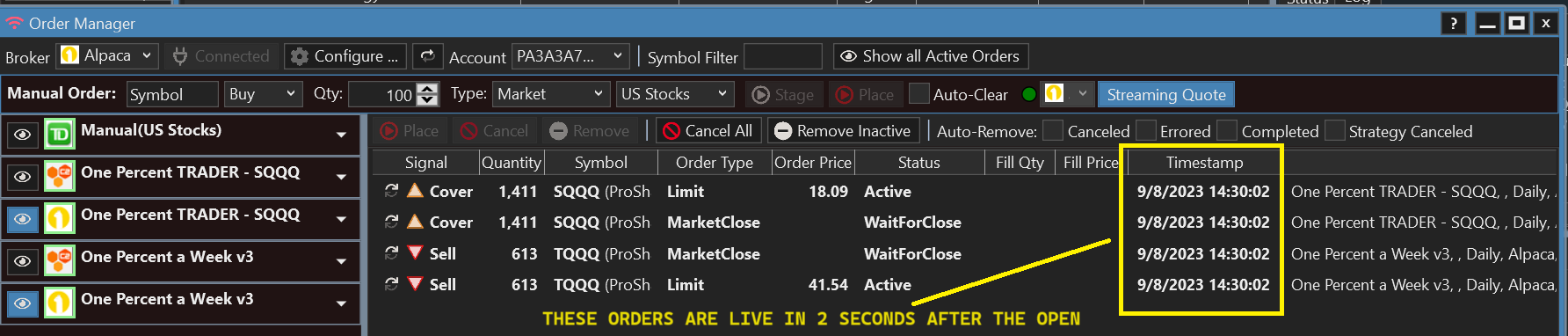
It's Friday, so for this strategy if the limit orders fill, the corresponding WaitToClose order will auto-cancel. Otherwise, WaitToClose will place Market Sell orders and the Limit order will be canceled n-seconds (set in Preferences) before the close.
It's Friday, so for this strategy if the limit orders fill, the corresponding WaitToClose order will auto-cancel. Otherwise, WaitToClose will place Market Sell orders and the Limit order will be canceled n-seconds (set in Preferences) before the close.
Your Response
Post
Edit Post
Login is required