Hi, I'm trying to add sound prompts but the following code errors. Same code in VStudio works without adding an assembly. Adding system.core to the assembly reference does not help.
Adding
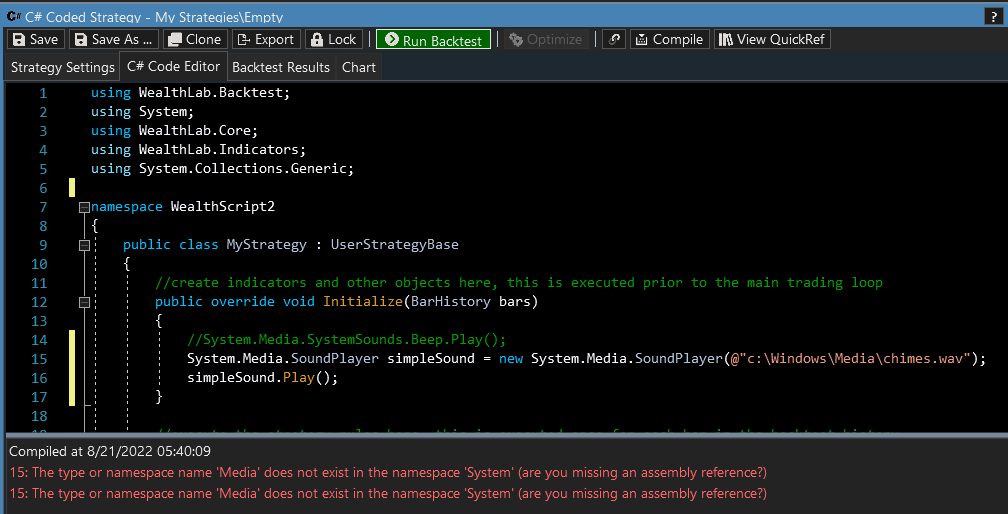
Adding
CODE:makes no difference.
using System.Media;
Rename
1. Open the Nuget website, you need the System.Windows.Extensions library (https://www.nuget.org/packages/System.Windows.Extensions/), click "Download package":
https://www.nuget.org/api/v2/package/System.Windows.Extensions/6.0.0
2. The downloaded file is a ZIP archive, unzip it and open this folder:
\runtimes\win\lib\net6.0\
3. Copy System.Windows.Extensions.dll to "c:\Program Files\Quantacula, LLC\WealthLab 8"
4. Restart WL8. Voila.
P.S. A reference to System.Core is not required.
https://www.nuget.org/api/v2/package/System.Windows.Extensions/6.0.0
2. The downloaded file is a ZIP archive, unzip it and open this folder:
\runtimes\win\lib\net6.0\
3. Copy System.Windows.Extensions.dll to "c:\Program Files\Quantacula, LLC\WealthLab 8"
4. Restart WL8. Voila.
P.S. A reference to System.Core is not required.
According to MSDN you need an assembly reference to System.Windows.Extensions.dll - https://docs.microsoft.com/en-us/dotnet/api/system.media.soundplayer.play?view=windowsdesktop-6.0
We don't have a way to select by default in Tools > Assembly References, so I think that means you need to find that file, copy it into the Wealth-Lab installation folder, and restart Wealth-Lab.
We don't have a way to select by default in Tools > Assembly References, so I think that means you need to find that file, copy it into the Wealth-Lab installation folder, and restart Wealth-Lab.
Thanks. Just one more step is needed:
Add the following assembly: System.ComponentModel.Primitives
Add the following assembly: System.ComponentModel.Primitives
Your Response
Post
Edit Post
Login is required