I expected this to show numbers above 1 and below 1 - as composit is an average, so some values are above average, some are below. But they all are far above).
Here are this series' values for tickers:
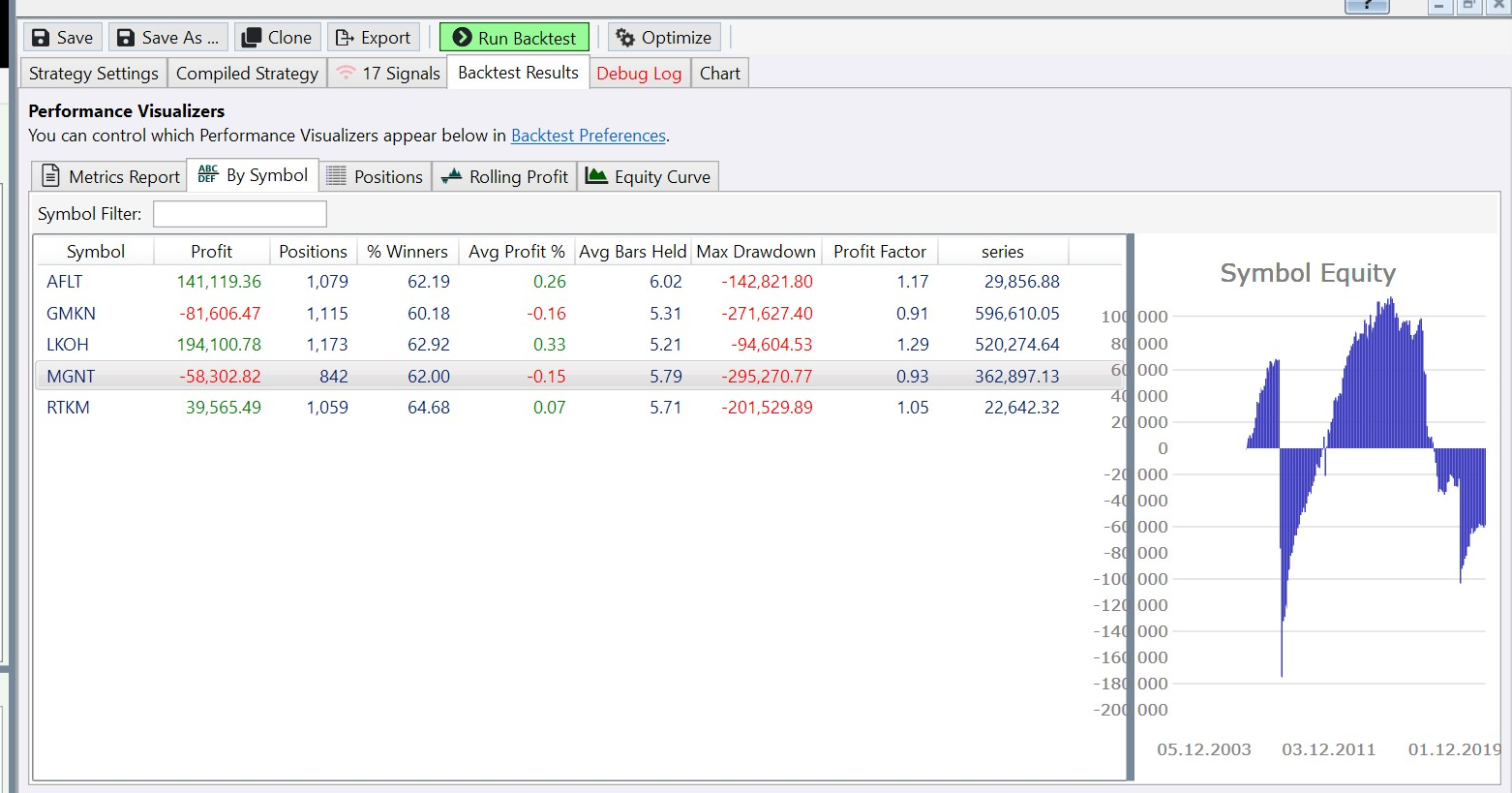
CODE:

moneyVolIndex = new SMA(bars.Close * bars.Volume, 1) /
                new CompInd(bars, ExecutionDataSetName, 2000, new SMA(bars.Close * bars.Volume, 1));

// ОТРИСОВКА TIMESERIES.
PlotTimeSeries(moneyVolIndex, "series", "series");
Here are this series' values for tickers:
Rename
Note that you can simply use Turnover instead of that SMA.
CompInd returns the average indicator value of all of the DataSet symbols. Volume is a positive figure and unless some of the prices turn negative you cannot really expect the indicator to fall below zero.
At any rate you can plot all TimeSeries to visualize them:
CompInd returns the average indicator value of all of the DataSet symbols. Volume is a positive figure and unless some of the prices turn negative you cannot really expect the indicator to fall below zero.
At any rate you can plot all TimeSeries to visualize them:
CODE:
var t = Turnover.Series(bars);
var ci = new CompInd(bars, ExecutionDataSetName, 2000, Turnover.Series(bars));
var moneyVolIndex = t / ci;

PlotTimeSeries(t, "t", "1");
PlotTimeSeries(ci, "ci", "2");
PlotTimeSeries(moneyVolIndex, "mvi", "3");
No, I didn't say below/above zero, but below/above 1.
Thanks, Eugene, turnover helped.
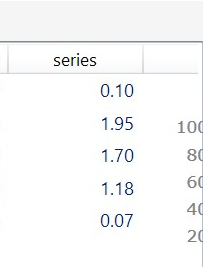
Still I do not understand why my previous code doesn't return the same results. Although this time I don't need the answer to move forward)).
Thanks, Eugene, turnover helped.
Still I do not understand why my previous code doesn't return the same results. Although this time I don't need the answer to move forward)).
Replikant, IndexLab currently doesn't support creating CompInd's on indicators whose source parameter is dynamically created, for example your expression of Close * Volume. It resolves to simply Close. I'm adding this limitation to the documentation.
QUOTE:
Replikant, IndexLab currently doesn't support creating CompInd's on indicators whose source parameter is dynamically created, for example your expression of Close * Volume. It resolves to simply Close. I'm adding this limitation to the documentation.
I see, thanks. Is creating a custom indicator a way to overcome this if I need? In this case - an indicator for Close*Volume for example.
Although it isn't an urgent need (for my needs), being able to do things like Close * Volume would be nice. Also composite indicator expects IndicatorBase, TimeSeries would be more flexible maybe.
Yes, creating a custom indicator will work for now.
QUOTE:
CompInd returns the average indicator value of all of the DataSet symbols.
And where is this documented? I tried searching for CompInd, composite, and indicators in both the Indicators area and the Help docs. There are zero hits. You clearly need a better search tool. Do I need to install a special extension to find this documentation?
UPDATE: I now see IndexLab is mentioned above. So do I have to install this extension in order to find CompInd in the Help docs?
Hi SuperTicker, yes it’s part of IndexLab, you can read more about it on the Extensions page.
To be fair, I couldn't find which methods matches the CompInd% from "?" documentation in WL7. Afters a small research CompIndPctExtreme - was the main candidate, but I couldn't find what string "aboveBelow" parameter is. Looks like it is "above" / "below" or maybe "Above" / "Below" or maybe something else.
As we once discussed, the "Above/Below" is an example of ParameterTypes.StringChoice that can be put to use by various extensions like Indicators. Here's a shortcut to learn the syntax by example: drop CompInd% on a chart, right click and choose "Push Dropped Indicators to New C# Strategy Window".
Oh, thanks, a kind of extra "documentation" for Indicators.
Maybe Superticker is on to something. Right now each Extension adds its help pages when it’s installed. Maybe we should just include ALL the Extensions’ help pages, with links to their Extension page on the web site.
QUOTE:
Maybe we should just include ALL the Extensions’ help pages, with links to their Extension page on the web site.
And that's what the MathWorks does for the MatLab toolboxes. All the documentation for the MatLab toolboxes is included even though you are only licensed for 5 or 6 toolboxes. In practice, this helps users discover toolboxes they didn't know they needed. :)
But the docs should lightly gray out the documentation that the user hasn't installed extensions for so he knows he needs to do something to get it. Also, a novice WL7 user could simply skip the grayed out doc parts.
Your Response
Post
Edit Post
Login is required